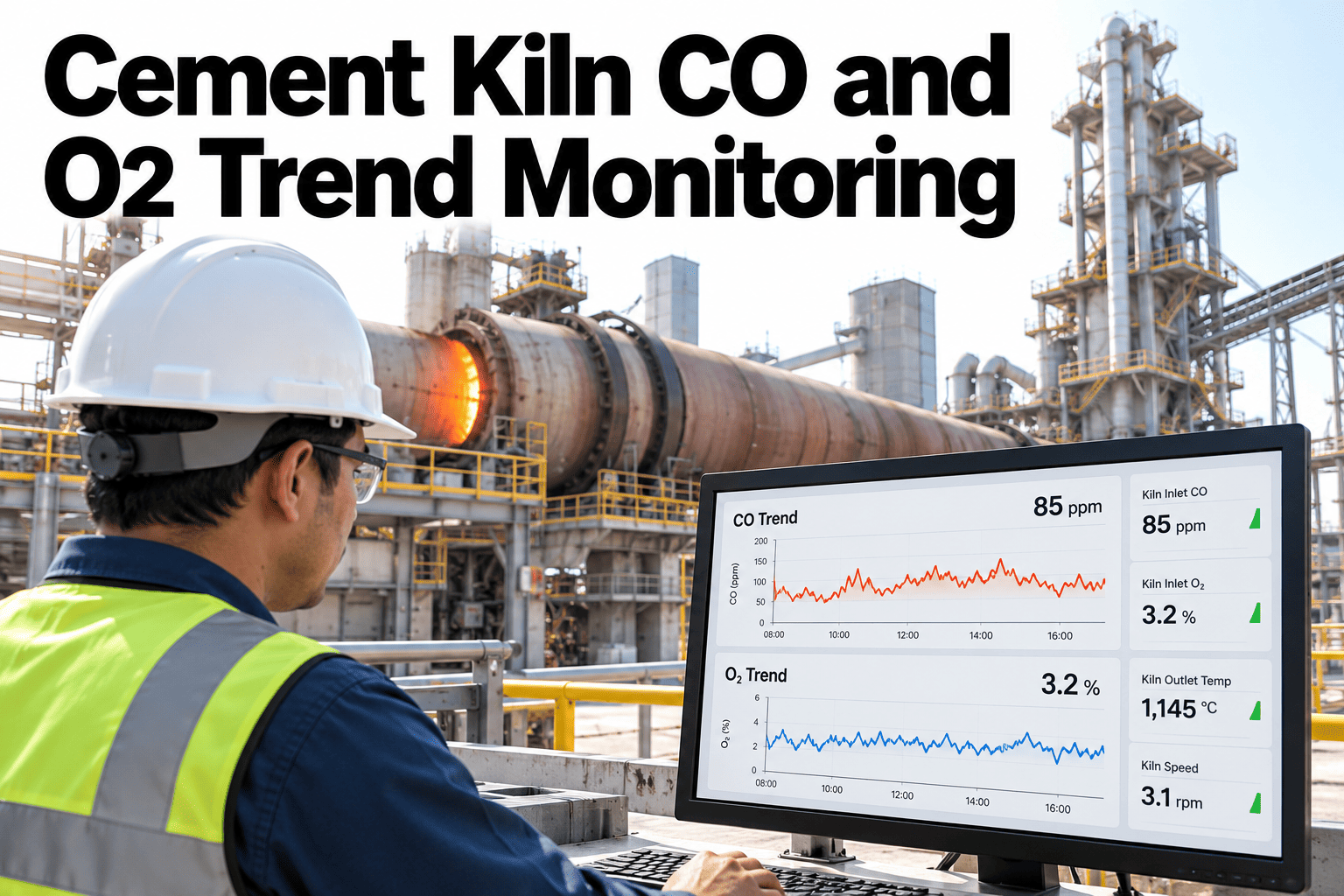
A single CO reading on a cement kiln dashboard tells an operator very little on its own. Combustion is a moving system, and what actually matters is how CO and O2 move together over the preceding minutes and hours, since a rising CO trend paired with a falling O2 trend tells a very different story than either number read in isolation. Reviewing the two as a connected trend, with alarm history and shift events lined up alongside, is what turns a dashboard reading into something an operator can act on with confidence. Process teams can discuss their own kiln data and use case with iFactory AI before the next combustion review.
A Single Reading Rarely Tells the Combustion Story
iFactory AI brings CO and O2 trends, alarm context and operating events into one view, so combustion shifts are easier to read and act on.
Why CO and O2 Need to Be Read Together
CO and O2 move in relation to each other as combustion conditions shift, and reading either alone misses half the picture an operator actually needs to judge what is happening in the kiln.
A CO spike can mean several different things depending on what O2 is doing at the same moment.
A falling O2 trend without CO context does not say whether combustion is actually incomplete.
A single moment in time can look fine even while the underlying trend is worsening.
An alarm firing in isolation does not show what was happening in the minutes before it.
What a Combined Trend View Includes
| Element | What It Adds |
|---|---|
| CO trend line | Shows direction and rate of change, not just the current value |
| O2 trend line | Plotted on the same timeline to show the relationship |
| Alarm markers | Shows exactly when and how long a threshold was exceeded |
| Operating events | Marks fuel changes, feed rate adjustments and other shift actions |
Review Your Own CO and O2 Trends Together
Bring a recent combustion event to a 30-minute working session.
From Raw Signal to Validated Trend
CO and O2 readings are logged at their sampling interval.
Readings are checked against expected ranges for obvious sensor issues.
Both signals are shown together against a shared timeline.
Alarms and operating events are marked on the same view.
Why the Lead-Up Matters More Than the Threshold Crossing
A threshold crossing is the moment a number passes a defined line, but the process that led there usually started well before that line was crossed. Focusing attention only on the moment of the alarm misses the earlier part of the story that would help prevent the next one.
An operator who can see the ten or twenty minutes before an alarm fired has a much better chance of recognizing the same pattern starting again next time, before it reaches the point of triggering a formal alarm at all. That earlier recognition is where the real operational value sits, not in the alarm response itself.
A Scenario: The Alarm That Looked Isolated
Picture a CO alarm that fires briefly during a shift, clears within minutes, and gets logged as a short-lived, low-significance event in the shift report.
Viewed only as an isolated alarm, that event looks minor. Viewed against the O2 trend from the preceding half hour, the same alarm might show a gradual O2 decline that had been building well before the CO threshold was crossed, suggesting a slower combustion shift rather than a momentary blip. Seeing the trend that led up to the alarm, not just the alarm itself, changes how the event should be interpreted and whether it warrants a closer look.
Isolated Readings vs a Connected Trend View
Why This Differs Across Kiln Types and Fuel Mixes
A precalciner kiln running a high alternative fuel substitution rate behaves differently from a long dry kiln running primarily traditional fuel, and the expected CO and O2 relationship shifts accordingly. A review approach built around one configuration should not be assumed to transfer directly to another without adjustment.
That is part of why a trend view calibrated against a plant's own historical operating pattern tends to be more useful than one built from generic industry thresholds, since the normal range for one kiln configuration can look unusual on a different one even when both are operating correctly.
What Belongs in a Shift-Level Combustion Review
Connecting Combustion Review to Maintenance Planning
A slow, gradual drift in the CO and O2 relationship over several weeks can sometimes trace back to a mechanical cause, like a burner nearing the end of its service interval or a damper not sealing as tightly as it once did, rather than a purely process-driven shift.
Connecting that gradual trend to maintenance scheduling turns a combustion observation into a proactive work order, addressing the mechanical cause before it progresses into something that shows up as a harder process problem to manage day to day.
Why Data Validation Matters Before Trend Review
A sensor drifting out of calibration can produce a trend that looks meaningful but actually reflects a hardware issue rather than a real combustion shift. Validating readings against expected ranges before they feed into a trend view protects against chasing a false signal.
That validation step does not need to be elaborate, a basic range check and a comparison against a redundant sensor where available catches most of the obvious cases, but skipping it entirely risks an operator spending time investigating a problem that is actually a sensor fault.
What a Growing Excursion Frequency Can Signal
A single excursion is often just normal process variation. A pattern of excursions clustering around certain fuel types, feed rates or times of day is a different kind of signal, one that points toward a systematic cause rather than a one-off event.
Excursions clustering around a specific fuel type or supplier.
Excursions appearing more often at certain feed rate levels.
A difference in frequency between shifts that may point to operating practice.
A gradual increase that coincides with a component nearing end of service life.
Building a Routine Combustion Review, Not Just an Investigation
Many plants only look closely at combustion trends after something has already gone wrong. A routine review, done on a regular cadence rather than only in response to an incident, catches drift while it is still small.
Where iFactory AI Fits
Plots CO and O2 together
Shows both signals on a shared timeline, not separate screens.
Adds alarm context
Shows the trend leading into every alarm, not just the trigger point.
Marks operating events
Layers fuel and feed rate changes directly onto the trend view.
Supports shift review
Builds a reviewable combustion summary for escalation and reporting.
Expert Review
A cement process engineering perspective, reviewed for accuracy before publication: combustion trends are one of the clearest cases where context changes the meaning of a number, since the same CO reading can be routine or significant depending entirely on what O2 and recent operating events were doing at the same time. Plants that review these signals together tend to catch slow drifts well before they become alarm events. Reviewing a recent combustion event against your own trend data is a useful way to see the difference context makes. Confirm specific feature capabilities against your plant's systems before relying on any workflow.
Frequently Asked Questions
How far back should a combustion trend review look?
Many plants review at least the preceding thirty to sixty minutes around an event of interest, since that window usually captures the lead-up to a shift rather than just the moment it crossed a threshold. Discuss a review window that fits your kiln dynamics.
Can this work alongside existing DCS alarm systems?
Yes, this is meant to add context around alarms already generated by the control system, not to replace the alarm logic itself. Ask about connecting this to your existing DCS alarms.
How are sensor validation issues handled?
Readings are checked against expected ranges and, where available, redundant sensors, so an obvious sensor fault does not get mistaken for a genuine process shift. Explore how validation would apply to your sensor setup.
Does this help with cross-shift comparison?
Yes, comparing the same time window across multiple shifts often reveals patterns tied to specific operating practices or fuel scheduling that a single-shift view would miss. Talk through cross-shift comparison for your combustion data.
How is this used during escalation or reporting?
A combustion event with its full trend, alarm history and operating context attached gives a reviewer a complete picture quickly, rather than requiring them to reconstruct the timeline from separate systems. See what an escalation-ready combustion summary includes.
See Your Kiln Combustion Data as a Connected Story
iFactory AI brings CO, O2, alarms and operating events into one trend view. Discuss your own plant data and use case.