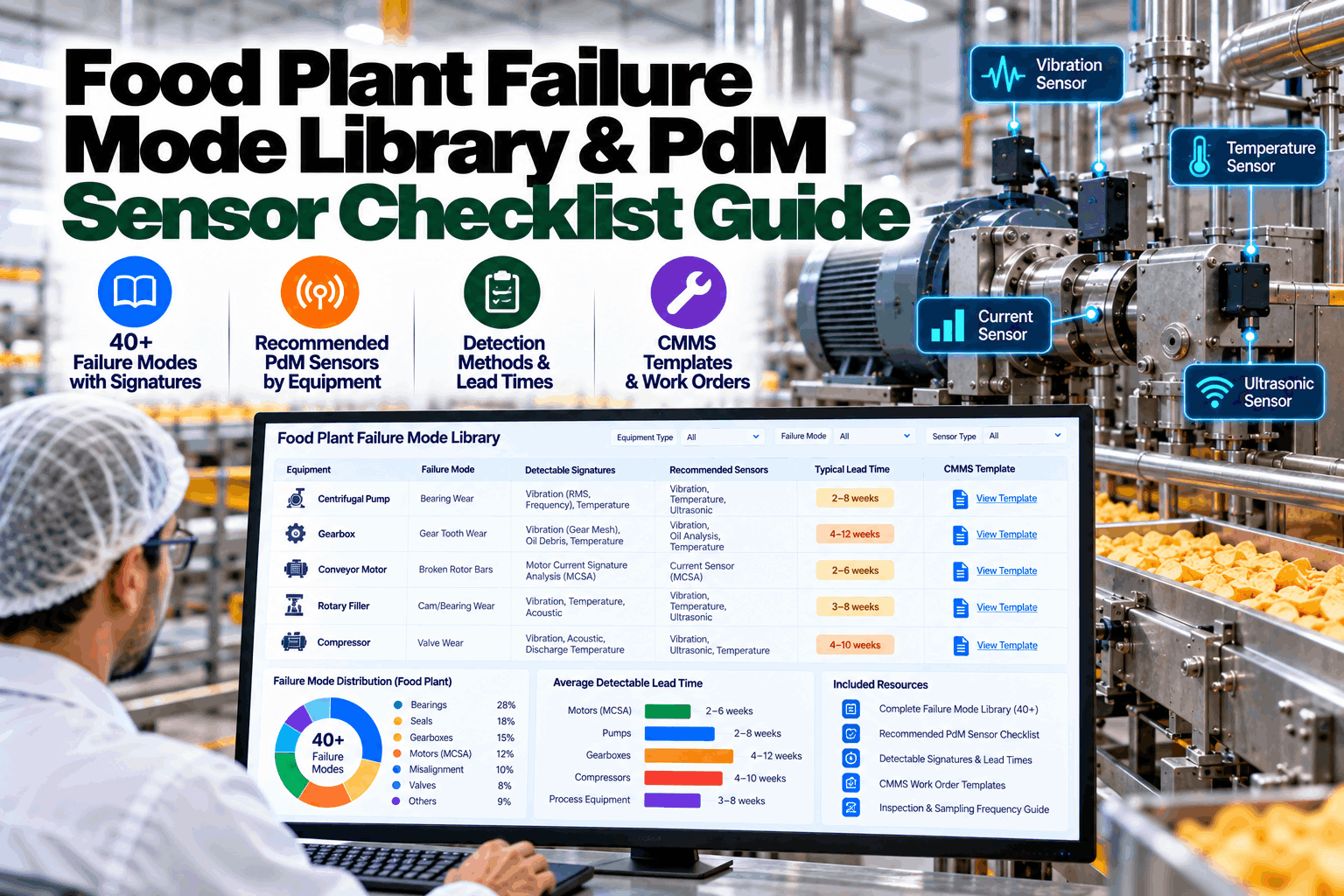
Every food plant has the same rotating equipment problems: bearings that fatigue, seals that leak, belts that slip, valves that wear, gearboxes that run hot. What most plants lack is a shared library that ties each failure mode to the signal that reveals it, the sensor that captures it, the warning time it gives and the work order that fixes it. This checklist guide provides that library, with more than 40 failure modes across the equipment found in dairy, beverage, meat, bakery and snack plants, plus a criticality method, a sensor selection checklist and CMMS templates. Our reliability engineers can tailor it to your asset register.
Food Plant Failure Mode Library and PdM Sensor Checklist: 40+ Failure Modes, Signatures and Lead Times
A practical catalogue linking each rotating equipment failure mode to its detectable signature, sensor, indicative warning window and CMMS task.
How to Use This Failure Mode Library
The library is built around a simple principle from condition monitoring practice: a failure mode is only worth monitoring if it produces a detectable change early enough to act on. ISO 17359 sets out that general approach for condition monitoring programmes, from equipment audit and failure mode analysis to selecting measurement methods and alert criteria. ISO 13379-1 covers data interpretation and diagnostics, and ISO 14224 provides a taxonomy for recording equipment, failure modes and causes consistently, so failure history becomes usable data.
Use the criticality method in section 04 to pick the assets where failure hurts most.
For each asset, pick the relevant rows from the tables in sections 02 and 03.
Keep the failure modes with a detectable signature and a useful warning window.
Use the sensor checklist in section 05 to pick technology and placement.
Create work order and inspection templates from section 06, one per failure mode.
Warning windows in the tables are indicative. Real P-F intervals depend on the machine, its load, its duty cycle and the failure mechanism, and should be refined with your own history. We can help calibrate them for your plant.
Failure Modes: Motors, Pumps, Gearboxes and Fans
These asset classes appear in every food plant, from utilities to process lines. Warning windows assume continuous or frequent monitoring.
| Asset | Failure mode | Detectable signature | Sensor or method | Indicative warning | CMMS task |
|---|---|---|---|---|---|
| Motor | Rolling bearing defect | Rising envelope energy at bearing defect frequencies | Accelerometer | Weeks to months | Bearing inspection and replacement |
| Motor | Broken rotor bar | Current sidebands at (1 ± 2s) × f | MCSA | Weeks to months | Plan motor swap |
| Motor | Stator insulation degradation | Current unbalance, winding temperature rise | Current and voltage, RTDs | Weeks | Electrical test and rewind or replace |
| Motor | Air-gap eccentricity | Eccentricity components in current and vibration | MCSA, accelerometer | Weeks to months | Check bearing fits and alignment |
| Motor | Overheating from overload | Current above rating, temperature rise | Current, temperature | Hours to days | Check driven load and duty |
| Centrifugal pump | Mechanical seal leak | Seal chamber temperature, leakage | Temperature, leak detection | Days to weeks | Replace seal |
| Centrifugal pump | Impeller wear or damage | Head and flow below curve; power change | Pressure, flow, power | Weeks to months | Impeller inspection |
| Centrifugal pump | Cavitation | High-frequency broadband vibration, noise | Accelerometer, suction pressure | Days | Check suction conditions |
| Centrifugal pump | Bearing defect | Bearing defect frequencies | Accelerometer | Weeks to months | Bearing replacement |
| PD pump (lobe, piston) | Lobe or valve wear | Volumetric efficiency drops; slip rises | Flow, speed, pressure | Weeks | Rotor or valve kit replacement |
| PD pump (lobe, piston) | Timing gear wear | Gear mesh vibration | Accelerometer | Weeks to months | Gearbox inspection |
| Gearbox | Gear tooth wear or pitting | Rising gear mesh energy and sidebands | Accelerometer, oil analysis | Weeks to months | Gear inspection |
| Gearbox | Lubrication breakdown | Oil temperature rise; wear debris | Temperature, oil analysis | Days to weeks | Oil change and cause analysis |
| Gearbox | Bearing defect | Bearing defect frequencies | Accelerometer | Weeks to months | Bearing replacement |
| Fan or blower | Imbalance | 1× running-speed vibration rise | Accelerometer | Weeks | Clean and balance |
| Fan or blower | Misalignment | 1× and 2× vibration, axial component | Accelerometer | Weeks | Laser alignment |
| Fan or blower | Belt slip or wear | Speed ratio change, belt frequency vibration | Speed, accelerometer | Days to weeks | Tension or replace belts |
| Fan or blower | Fouling | Airflow and power change at same speed | Pressure, power | Weeks | Clean impeller |
Eighteen entries in this table cover the assets that make up most of a plant’s motor-driven fleet. Loading them into a CMMS takes little time with our templates.
Failure Modes: Food Process and Packaging Equipment
| Asset | Failure mode | Detectable signature | Sensor or method | Indicative warning | CMMS task |
|---|---|---|---|---|---|
| Homogenizer | Pump valve or seal wear | Per-cylinder pressure pulse asymmetry | Fast pressure transmitter | Days to weeks | Valve or seal kit replacement |
| Homogenizer | Homogenizing valve wear | Actuator effort rise at same pressure | Hydraulic pressure | Weeks | Homogenizing device rebuild |
| Separator or centrifuge | Bowl imbalance | Vibration at bowl speed | Accelerometer | Hours to weeks | Stop, clean, inspect bowl |
| Separator or centrifuge | Spindle bearing wear | Bearing defect frequencies | Accelerometer | Weeks | Bearing replacement |
| Rotary filler | Filling valve wear | Per-valve fill deviation and fill time drift | Checkweigher, flowmeter, encoder | Days | Valve seal kit |
| Capper | Chuck or clutch wear | Torque profile drift per head | Servo torque data | Days to weeks | Chuck insert or clutch replacement |
| Conveyor | Chain elongation | Drive torque rise; pitch measurement | Current, manual gauge | Weeks | Chain replacement |
| Conveyor | Bearing or roller seizure | Torque rise, local heating | Current, temperature | Days | Roller replacement |
| Mixer | Gearbox wear | Gear mesh vibration, oil temperature | Accelerometer, temperature | Weeks to months | Gearbox inspection |
| Meat grinder | Knife and plate wear | Energy per kilogram rise, load ripple | Motor current | Days | Change cutting set |
| Extruder | Screw and barrel wear | Output per rpm falls; SME drift | Drive and feeder data | Weeks to months | Plan reline |
| Tunnel oven | Band mistracking | Tracking correction frequency rise | Tracking system data | Days to weeks | Alignment and tension check |
| Tunnel oven | Burner flame instability | Flame signal weakening or noisy | Burner management data | Days | Clean or replace scanner, tune burner |
| Ammonia compressor (recip) | Valve leak | Valve cover temperature; pV distortion | Temperature, cylinder pressure, ultrasound | Days to weeks | Valve replacement |
| Ammonia compressor (recip) | Rod packing leak | Packing vent temperature or flow rise | Temperature, flow | Days to weeks | Packing replacement |
| Ammonia compressor (screw) | Bearing wear | High-frequency vibration rise | Accelerometer | Weeks to months | Bearing replacement |
| Air compressor | Air-end bearing wear | Bearing defect frequencies | Accelerometer | Weeks to months | Air-end service |
| Air compressor | Inlet valve or control fault | Load and unload cycling change | Pressure, power | Days | Inspect control valves |
| Vacuum pump | Vane or rotor wear | Pump-down time rise, power change | Vacuum, power | Weeks | Vane replacement |
| Vacuum pump | Oil contamination | Temperature rise, vacuum loss | Temperature, vacuum | Days | Oil change |
| Cooling tower fan | Gearbox or drive shaft wear | Vibration, oil temperature | Accelerometer, temperature | Weeks to months | Gearbox inspection |
| Evaporator or condenser fan | Bearing defect or imbalance | Vibration at bearing or 1× frequency | Accelerometer | Weeks | Bearing replacement or balance |
| Labeller | Vacuum drum or glue system wear | Vacuum level drift; label placement errors by position | Vacuum sensor, vision inspection | Days | Drum seal or glue roller service |
| Palletizer | Hoist chain or gearbox wear | Hoist current rise; vibration at gear mesh | Current, accelerometer | Weeks | Chain and gearbox inspection |
Together the two tables list 42 failure modes; adding plant-specific entries is part of our onboarding.
Ranking Assets by Criticality Before Buying Sensors
No plant monitors everything. Criticality ranking decides where monitoring pays back. A practical approach scores each asset on a few consequences of failure and on how likely failure is, then multiplies or sums them. Food plants should always include food safety as a consequence, not just production.
| Criterion | Low (1) | Medium (3) | High (5) |
|---|---|---|---|
| Food safety and quality impact | No product impact | Quality deviation, rework | Food safety risk, recall exposure |
| Worker safety and environment | None | Minor hazard | Serious hazard or regulated release |
| Production impact | Redundant or bypassable | Line slows | Line or plant stops |
| Repair time and parts | Hours, parts in stock | Days, parts available | Weeks, long-lead parts |
| Failure frequency | Rare | Occasional | Frequent |
Assets that score high on consequences and have detectable failure modes are the first candidates for continuous monitoring. High-consequence assets without detectable modes need design changes, redundancy or preventive tasks instead. Our engineers can run the scoring with your team.
PdM Sensor Selection Checklist
For washdown mounting details, see our separate food-grade sensor placement checklist, or ask our team.
CMMS Work Order Templates for Condition-Based Tasks
A condition alert is only useful if it turns into the right work. Each failure mode in the library should have a matching CMMS template, so technicians receive a complete job rather than an alarm.
Recording as-found condition and cause codes consistently is what turns the library into a learning system. After a year, your own data tells you which warning windows are right for your plant. We can share templates for your CMMS.
Using P-F Intervals to Set Inspection and Alert Timing
The P-F interval is the time between the first detectable sign of a failure, P, and functional failure, F. For periodic inspections, a common reliability rule of thumb is to inspect at intervals well inside the P-F interval, so a developing failure is caught with time to plan. Continuous monitoring removes much of that guesswork. Talk to our specialists about setting intervals for your assets.
Putting the Library to Work
Pre-loaded for food plant equipment, extendable with your own entries.
Critical assets checked against their detectable failure modes.
Recommended sensors and placement for each gap.
Each alert linked to its CMMS template.
Your history refines P-F intervals over time.
Structure consistent with ISO 17359, 13379-1 and 14224 practice.
See your own coverage map in a guided session.
Map Your Critical Assets Against the Library
Share your asset register and last year’s failure history. We score criticality, map failure modes, show your monitoring gaps and prepare CMMS templates.
Gear mesh sidebands rising and oil temperature trending up. Library match: gear tooth wear.
How Deployment Works
iFactory ships as a pre-configured NVIDIA AI server, racked and ready with the failure mode and condition monitoring models loaded. Rack it, plug in power and Ethernet, and the AI is live on your network. Our scope covers sensor and PLC/SCADA integration, cabling and network setup, operator and technician training, and 24×7 remote monitoring.
Server installed, sensors and controllers connected, historical work orders and failure history loaded.
Baselines learned per asset, alerts piloted on the first line with your maintenance team reviewing every finding.
Rollout to the agreed assets, technician training, CMMS hand-off and 24×7 remote monitoring in place.
Most plants start with the library itself, loading failure modes and templates for their top 50 critical assets, then add sensors where the coverage map shows gaps. The sequence is agreed on a planning call.
Frequently Asked Questions
A structured catalogue of how each type of equipment fails, what signal reveals each failure, which sensor detects it, how much warning it typically gives and what work order fixes it. See ours in a demo.
They are indicative ranges from condition monitoring practice. Real P-F intervals vary with machine, load and failure mechanism, so they should be refined with your own failure history. Our engineers can help calibrate them.
ISO 17359 gives general guidelines for condition monitoring, ISO 13379-1 covers data interpretation and diagnostics, ISO 14224 provides a reliability data taxonomy, and ISO 20816-1 covers machine vibration evaluation. Ask our specialists how they fit.
Rank assets by consequence of failure, including food safety, worker safety, production impact and repair time, and by failure frequency. Monitor high-criticality assets with detectable failure modes first. Book a workshop.
Each failure mode gets a CMMS template with evidence, checks, parts, safety steps and close-out codes, so alerts become complete work orders. Get the templates.
Loading the library and templates for your top critical assets can start in the first weeks. Full sensor and analytics programs typically go live in 6–12 weeks. Plan it with our support team.
Know Which Failures You Can See Coming, and Which You Can’t
iFactory maps your critical assets against a food plant failure mode library, closes the monitoring gaps and turns every alert into the right work order.
Every alert is tagged to a failure mode in the library, with its signal and lead time.