Most production schedules are built once a week, or once a shift, against a plan that assumes every machine runs at rated speed, every changeover takes exactly as long as the standard says, and nothing breaks down in between. Real production never holds that still. A single late tool delivery, one machine running slower than spec, or an unplanned changeover cascades through the rest of the week's plan in ways a static schedule was never built to anticipate. See how iFactory's simulation-based scheduling tests schedule alternatives against your actual production constraints before a single order is committed to the floor.
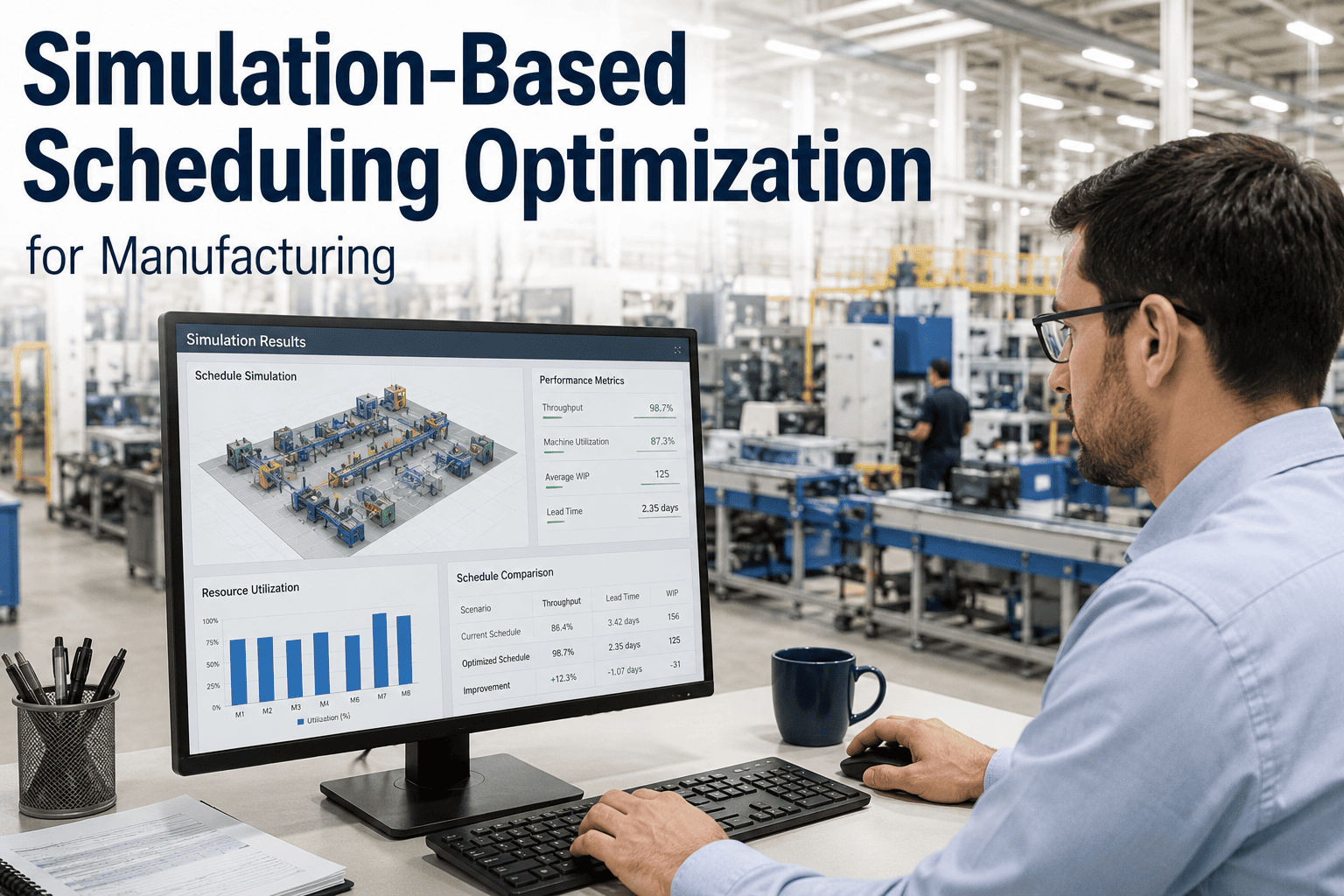
Simulation-Based Scheduling Optimization for Manufacturing
Run your production schedule through a simulation model before committing it to the floor — testing sequencing alternatives, resource utilization, and changeover impact against the real constraints of your plant instead of the idealized assumptions behind a spreadsheet plan.
A Schedule Is a Guess Until It's Tested
Traditional production scheduling — resource calendars, spreadsheet-based sequencing, even most enterprise scheduling modules — treats capacity as a fixed number and time as a straight line. A machine has a rated throughput, a changeover has a standard duration, an operator shift covers a fixed window, and the schedule is built by stacking jobs against those numbers until the week is full. The problem is that real manufacturing systems are not linear. Job-shop scheduling in particular is what researchers classify as an NP-hard problem — the number of possible sequences grows so large, so fast, that no static planning method can realistically evaluate more than a small fraction of the feasible options before committing to one.
The result is schedules that look complete on paper and fail the moment reality introduces variability that the plan didn't account for. A changeover that runs ten minutes longer than standard on job three pushes every job behind it. A machine that's actually running at ninety percent of rated speed compounds that delay across an entire shift. Traditional resource-calendar models offer a better starting point than a spreadsheet, but they still fall short of modeling the complex constraints and process variability that determine whether a schedule that looks optimal on paper actually survives contact with the floor.
This gap matters more as product mix widens. A facility running a handful of stable, high-volume products can often get away with a schedule built on averages, because the variability from job to job is small enough not to compound into a serious problem. A facility running dozens of variants with different changeover profiles, different tooling requirements, and different due-date pressures doesn't have that luxury — the averages stop representing any individual job well enough to plan against, and the planner ends up reacting to the schedule breaking down in real time rather than preventing the breakdown in advance.
Testing the Schedule Before the Floor Has To
Capacity is treated as a fixed number. Jobs are sequenced against that number using rules or a planner's judgment. The schedule is published, and the first real test of whether it works happens live, on the production floor, with real orders at stake.
A digital model of the production system — machines, changeovers, buffers, labor, tooling — runs the proposed schedule virtually first, surfacing bottlenecks, resource conflicts, and delivery risk before a single job is released to the actual floor.
The core technique behind this is discrete-event simulation: a model that steps through the production system event by event — a job arriving, a machine starting, a changeover beginning, a part completing — capturing the actual sequencing logic and variability of the real system rather than reducing it to an average throughput number. Layered with optimization algorithms that can search across thousands of sequencing possibilities, the simulation doesn't just show what one proposed schedule would do — it can actively search for a better one.
From Proposed Sequence to Validated Schedule
Machines, changeover times, buffer capacities, labor availability, and tooling constraints are represented as a discrete-event simulation model that mirrors how your actual production system behaves, not an idealized version of it.
Rather than testing a single proposed sequence, an optimization algorithm generates a wide range of candidate schedules — different job orderings, different resource assignments — for the model to evaluate.
Every candidate schedule runs through the simulation model virtually, surfacing where it would create bottlenecks, idle resources, missed deadlines, or excessive changeover time under realistic variability.
Each candidate is scored against the metrics that matter for your operation — makespan, on-time delivery, resource utilization, changeover minimization — often balancing several competing objectives at once.
The algorithm iterates toward the best-performing sequence found, producing a schedule that has already been stress-tested against real constraints before a planner ever releases it to the floor.
Test the Schedule Virtually Before It Costs You a Shift
iFactory simulates your production schedule against real machine, labor, and changeover constraints — surfacing conflicts and bottlenecks before jobs are ever released.
Six Objectives a Good Schedule Has to Balance
Sequencing products to reduce non-productive setup time, accurately modeling sequence-dependent changeovers where the cost of switching depends on which specific product ran before it.
Keeping machines and labor productively occupied without over-scheduling any single resource into a bottleneck that stalls everything downstream of it.
Sequencing jobs so committed customer delivery dates are met, weighing priority orders against overall throughput rather than optimizing pure efficiency at the expense of due dates.
Testing where work-in-process buffers should sit and how large they should be to protect constraint operations without tying up excess inventory investment across the line.
Modeling the relationship between production schedules, tool life, and changeover requirements so a schedule isn't approved on paper only to fail because the right tooling isn't actually available.
Accounting for shift patterns, skill requirements, and labor availability, since a mathematically optimal machine schedule that no available operator can actually staff isn't a usable schedule.
These objectives frequently pull against each other, which is exactly why simulation-based optimization matters more than a single-objective calculation. Minimizing changeover time might mean running similar products back to back, but that sequencing choice could delay a high-priority order that needed to run earlier. Maximizing machine utilization might mean keeping every resource busy, but that can inflate work-in-process inventory beyond what buffer capacity was designed to hold. Multi-objective optimization approaches are built specifically to search for schedules that balance these competing goals rather than maximizing one at the expense of the others.
Comparing Schedule Alternatives Side by Side
The practical value of simulation-based scheduling shows up most clearly when two or three reasonable-looking schedules are compared against each other before either one touches the floor. A sequence that minimizes changeover time might create a resource bottleneck two shifts later. A sequence that maximizes machine utilization might push a high-priority order past its delivery date. Without simulation, choosing between these tradeoffs is a matter of planner intuition — informed, but untested. With simulation, each alternative is run against the same model and the same variability assumptions, so the comparison is based on projected outcomes rather than a guess about which sequence "feels" more efficient.
This becomes especially valuable in mixed-model production, where managing sequencing uncertainty across product variety, resource allocation, and process variability is a genuinely difficult planning problem. A digital twin framework that combines simulation with real production data allows planners to evaluate alternative sequencing policies while capturing how product variety and resource constraints actually interact — something a static rule-based sequencing method structurally cannot do.
The number of alternatives worth comparing doesn't need to be large to be useful. Even testing three or four genuinely different sequencing strategies — prioritize by due date, minimize changeovers, balance machine utilization, protect the known bottleneck — against the same simulation model gives planners a concrete, quantified basis for the tradeoff they're making, rather than a single schedule presented as the only option and accepted on faith.
Why This Works Best Connected to a Live Digital Twin
A simulation model built once and never updated drifts from reality the same way a static schedule does — machine performance changes, new products enter the mix, and the model's assumptions gradually stop matching the actual plant. The more current thinking in digital twin technology treats the simulation as continuously synchronized with real production data, so the model evolves as the production system itself evolves rather than requiring a periodic manual rebuild to stay accurate.
That synchronization is also what enables dynamic rescheduling rather than one-time schedule generation. When an unplanned event actually occurs on the floor — a machine goes down, a rush order arrives, a shipment of raw material is delayed — a digital twin with live production data can re-run the optimization against the current, disrupted state of the plant rather than the idealized state the original schedule assumed, generating a revised plan that accounts for what has actually happened instead of forcing planners to manually rework the schedule from scratch.
The Search Methods Behind the Optimization
Because the number of possible schedules in even a moderately complex job shop is too large to evaluate exhaustively, simulation-based scheduling relies on optimization algorithms purpose-built to search intelligently rather than brute-force every combination. Metaheuristic approaches — including particle swarm optimization and ant colony optimization — are commonly applied to this class of problem because they're effective at navigating large, complex solution spaces without requiring the problem to be simplified into something a traditional linear model could solve directly.
These approaches are frequently hybridized with the simulation model itself and, increasingly, enhanced with digital twin technology so the optimization search is guided by data reflecting current plant conditions rather than static historical averages. The specific algorithm matters less to a manufacturer evaluating this technology than the outcome it produces: a schedule that has been searched and tested against a realistic model of the plant, rather than selected from a small handful of manually considered options.
Frequently Asked Questions
Find the Optimal Sequence Before You Commit to It
iFactory's simulation-based scheduling tests alternatives against your real production constraints — resource utilization, changeovers, delivery dates — so the plan you release has already survived contact with reality.