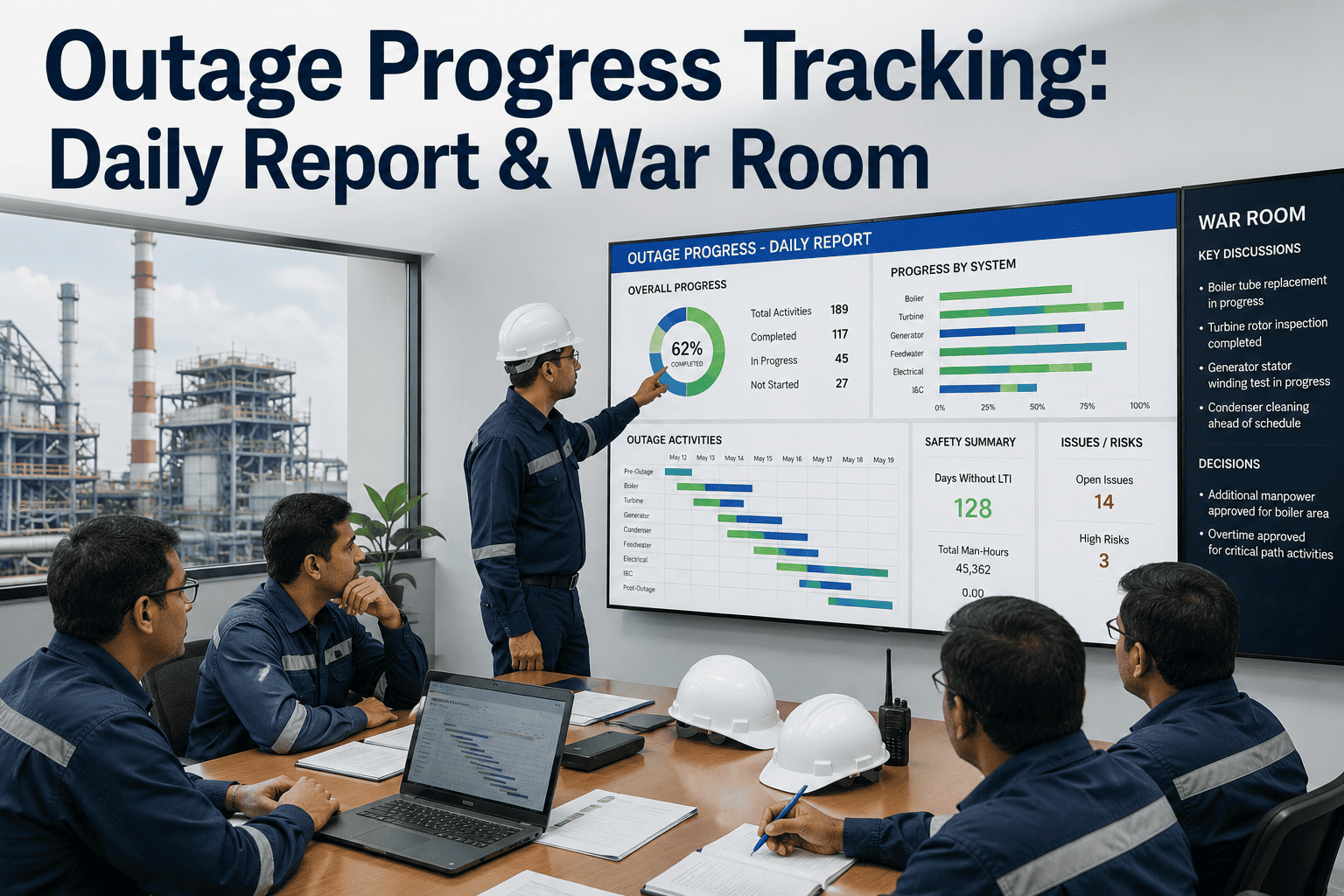
Somewhere around day four of a three-week outage, the gap between the printed schedule on the wall and what is actually happening on the floor starts to widen, and by the time anyone notices, a critical path activity has already slipped a full shift. The traditional fix is a war room built around a whiteboard, a stack of contractor reports, and a planner manually re-keying percent-complete numbers into a spreadsheet before the seven o'clock meeting. That approach works until the outage gets complicated, at which point the war room spends more time reconciling conflicting numbers than actually managing exceptions. A digital progress tracking layer keeps the daily report, the war room discussion, and the schedule itself all pointed at the same live data. Outage teams looking to close that gap can Book a Demo to see a live war room dashboard running against a real schedule.
Run The War Room On Real Numbers, Not Yesterday's Spreadsheet
Daily stand-up meetings, war room coordination, and real-time schedule updates, with exception management and escalation built in so drift gets caught the same day it happens.
Why The War Room Is Always A Day Behind
A typical outage war room runs on data that has already passed through several hands before anyone sees it. A foreman estimates percent complete at the end of a shift, a contractor superintendent rolls it up into a written report, and a planner keys it into the master schedule the following morning, often hours before the next stand-up meeting begins. Each handoff adds delay and a small amount of judgment, and by the time the number reaches the war room wall it reflects where the job stood yesterday, not where it stands right now.
That lag matters most on the critical path. A single activity running behind by even half a shift can push the entire outage end date if nobody catches it early enough to recover, but a war room working from yesterday's numbers discovers the slip a full cycle after it started. The fix is not more reporting discipline, it is closing the distance between where progress happens and where it gets recorded, so the war room is looking at today's status instead of reconstructing it from memory.
What A Data-Driven Outage Day Actually Looks Like
A well-run outage follows a consistent daily rhythm, and each stage depends on the one before it feeding accurate, current information rather than a delayed estimate.
Field Update
Crews log percent complete and status directly against the schedule activity as work happens, not at the end of the shift.
Auto-Roll Schedule
Field updates flow directly into the master schedule, recalculating critical path impact without manual re-entry.
Exception Flagging
Activities behind threshold are flagged automatically before the stand-up, instead of being caught during the meeting itself.
War Room Review
The daily stand-up opens directly on flagged exceptions and critical path status, so discussion time goes to decisions, not data-gathering.
Escalation
Decisions and recovery actions are logged against the schedule and routed to the right owner for same-day follow-up.
What Should Be On The Wall Every Morning
The best war rooms condense a complex outage into a handful of views that every stakeholder can read at a glance, without digging through a stack of contractor reports first.
A single rolled-up percent complete line compared against the baseline schedule, updated from field data instead of a manual estimate.
Current standing on the longest path through the outage, showing exactly how much float remains before the end date moves.
Every activity that crossed a variance threshold in the last 24 hours, ranked by schedule impact rather than listed chronologically.
Give Your War Room A Dashboard That Isn't A Day Late
iFactory connects field progress updates directly to the master schedule, so the daily stand-up opens on today's exceptions instead of yesterday's estimates.
How An Exception Should Move Once It's Flagged
Flagging a delayed activity is only useful if it triggers a clear next step. Outage teams that struggle with recovery usually have a flagging process but no defined escalation path behind it.
Crew Level
Minor variance under a shift is handled directly by the foreman and superintendent, logged but not escalated further.
Area Coordinator
A variance approaching a full shift is routed to the area coordinator for a recovery plan before the next stand-up.
Outage Manager
Critical path impact or a projected end-date slip goes straight to the outage manager for a same-day resourcing decision.
Executive Briefing
A confirmed end-date change is summarized for plant leadership with the recovery plan already attached, not just the problem.
What A Good Variance Threshold Framework Looks Like
The exception flag is only as useful as the threshold behind it. A framework that treats every activity the same either buries the war room in noise or lets a genuine critical path slip pass by unnoticed until it is too late to recover cleanly.
Critical Path Activities
Given the tightest threshold, often a few hours of variance, since any slip here has a direct path to moving the outage end date.
Float-Heavy Activities
Allowed a wider variance window before flagging, since available float can absorb a modest delay without threatening the schedule.
Weather-Sensitive Work
Tracked against a separate contingency threshold that accounts for forecast risk rather than the standard variance trigger.
Permit-Dependent Steps
Flagged earlier than the general threshold, since a permit delay often cascades into every downstream activity that depends on it.
What Changes When The Schedule Updates Itself
| Factor | Manual War Room | Connected Tracking |
|---|---|---|
| Data freshness | Reflects the previous shift or day | Reflects field status as it is logged |
| Exception detection | Found during the stand-up discussion | Flagged automatically before the meeting starts |
| Schedule updates | Manually re-keyed by a planner | Rolled up automatically from field entries |
| Escalation routing | Verbal, dependent on who is in the room | Logged and routed to a defined owner |
| End-of-outage report | Rebuilt afterward from notes and memory | Compiled automatically from the daily record |
Where Outage Progress Tracking Breaks Down
No Defined Variance Threshold
Without a clear trigger for what counts as an exception, every stand-up becomes a subjective debate about which items even need discussing.
Percent Complete By Estimate
A foreman's gut-feel percentage drifts further from reality the longer an activity runs, especially on multi-day critical path work.
Escalation With No Owner
A flagged exception that has no assigned decision-maker often sits unresolved until it shows up again the next day, worse.
Reports Rebuilt After The Fact
Reconstructing a full outage report from scattered notes after the unit is back online wastes time that should go toward the next outage's planning.
Outage Progress Tracking — Common Questions
How is percent complete captured without relying on a foreman's estimate?
Crews log status directly against the specific schedule activity from the field, often through a mobile device, so the number reflects what was actually completed rather than a rounded guess given at the end of a long shift. Photo attachments and milestone checkpoints can back up the reported status for higher-risk activities. This keeps the war room working from data instead of impressions.
What counts as an exception that should be flagged for the war room?
Most outage teams define a variance threshold, commonly a set number of hours behind baseline on critical path work, that automatically flags an activity for review rather than leaving it to individual judgment. Non-critical path activities usually get a looser threshold since they carry more float before impacting the end date. Teams can work out the right thresholds for their outage type with the iFactory Support team.
Can the schedule update automatically as field progress comes in?
Yes, field-reported status flows directly into the master schedule and recalculates critical path standing without a planner manually re-entering each update. This removes the lag between when progress happens and when the schedule reflects it, which is usually the single biggest source of a war room working from stale numbers. The recalculated schedule is what feeds the exception list each morning.
How does escalation routing actually work during an active outage?
Flagged exceptions are routed based on severity, with minor variances staying at the crew level and critical path or end-date impacts going straight to the outage manager the same day rather than waiting for the next scheduled meeting. Each escalation is logged against the schedule activity so there is a clear record of who made the call and when. This tiered routing keeps small issues from clogging the same channel as genuine end-date risks.
How quickly can a connected war room dashboard be set up before an outage?
A dashboard tied to an existing schedule and mobile field reporting can typically be configured in the weeks leading into a planned outage, well ahead of the actual work window. Teams often run it alongside their existing process for one outage before fully retiring the manual spreadsheet. Teams ready to plan ahead of their next outage can Book a Demo to see setup timing.
Stop Running Your War Room On Yesterday's Numbers
Talk to iFactory about connecting field progress to your outage schedule before the next war room meets.