A driver's report is only useful if it reaches the workshop in a form that can be acted on. In Fleet Maintenance, the iFactory micro app, a defect and its work order are linked in both directions and to the vehicle, so nothing is copied from one screen to another. Here is how to turn a defect into a work order without retyping it.
Fleet Maintenance · Defects · Work orders
Turn a driver's defect into a work order without retyping it
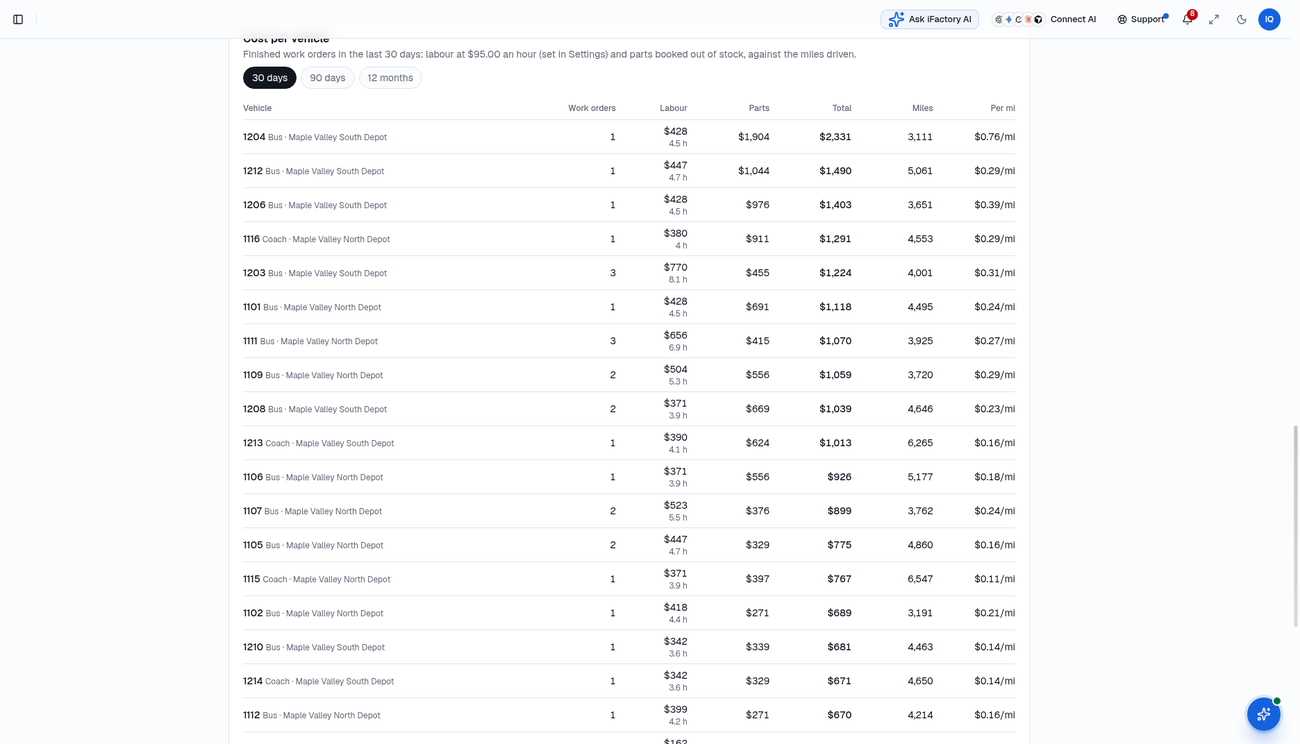
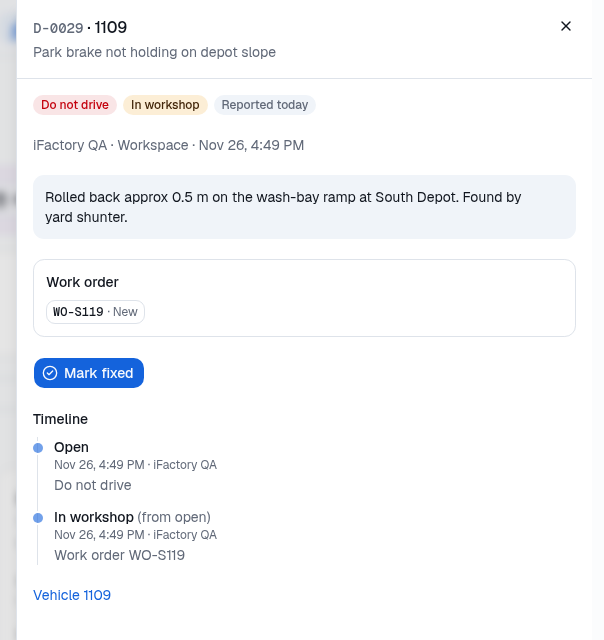
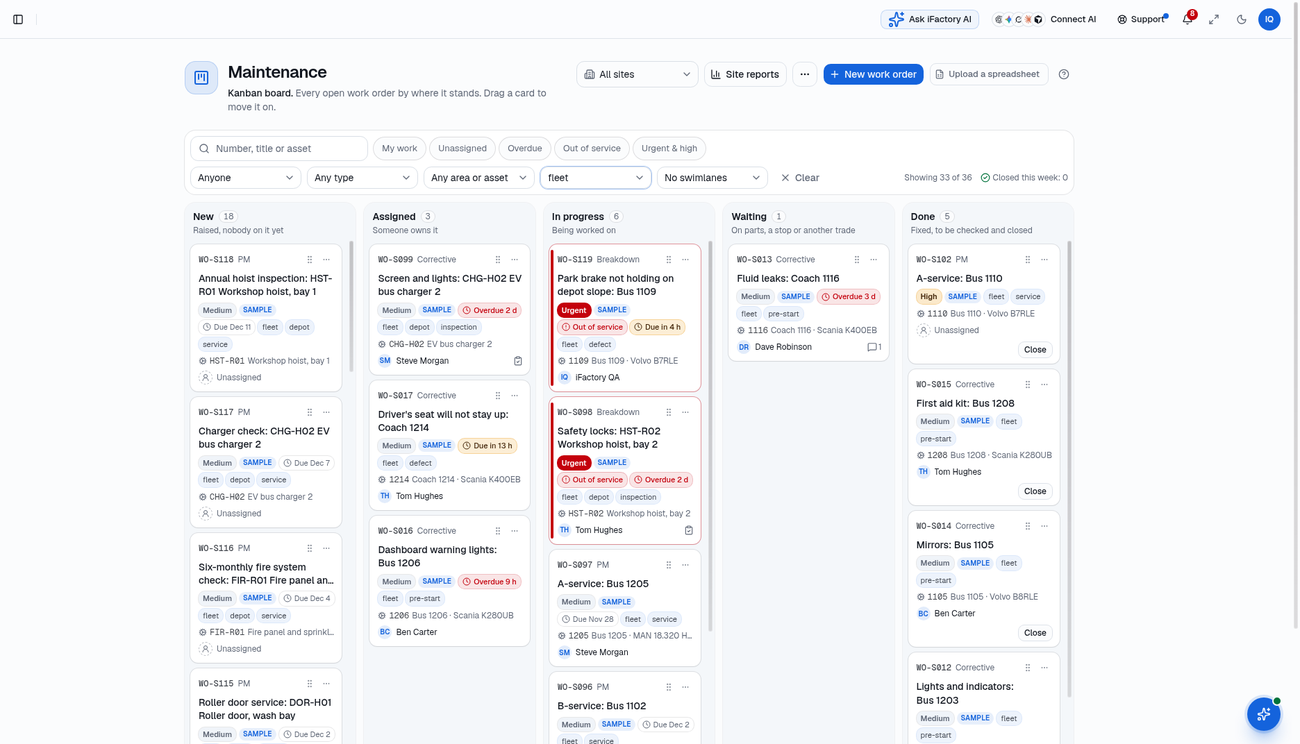
Do not drive raises an urgent work order by itself, and a smaller fault gets one in a single tap when the workshop is ready. Both orders stay linked to the defect and the vehicle, and the labour and parts booked on them land on the vehicle's cost.
Two routes from defect to work order
The route depends on the severity the driver chose when reporting the fault, so urgent faults never wait for a supervisor to read a message.
Close the gap between fault and fix
The driver reports it, the workshop gets an order, and the vehicle carries the cost. The sample fleet shows the whole chain with real-looking records.
What the work order carries
Nothing needs to be copied across from the defect, because the order is created with the details already attached.
Back to the defect
The work order points to the defect and the vehicle, and the defect shows the work order number and its status, so either record leads to the other.
Fleet label
Fleet jobs run on the same Maintenance board as other work, filtered by the fleet label, so the workshop sees one queue and not two.
Priority
A Do not drive defect arrives as Urgent, which puts it at the top of the board without anyone having to change its priority.
Finish to Fixed
Finishing the linked work order marks the defect Fixed, with who and when, and a supervisor then marks it Checked.
What lands on the vehicle's cost
Work booked on the order is added to the vehicle it was done on, which is how the cost figures stay trustworthy.

Keeping the paper trail short
A few habits stop the chain breaking between the driver and the workshop.
Choose the severity honestly
Do not drive should be used when the vehicle is unsafe, since it takes the vehicle off the road and raises an urgent order.
Raise the order when ready
For smaller faults, wait until a bay is free, then raise the order in one tap so the board shows only jobs that can start.
Book parts and hours on the order
Cost only reaches the vehicle if work is booked on the order, so record labour and parts before the job is finished.
Frequently asked questions
Does every defect get a work order?
No. A Do not drive defect gets an urgent work order automatically the moment the driver reports it. For a Safe to drive, report it defect, the workshop raises the work order in one tap when it is ready, so the board is not filled with jobs that cannot yet be started.
Is the work order linked back to the defect?
Yes, in both directions. The defect shows the work order number and its status, while the work order points back to the defect and to the vehicle. Whichever record someone opens first, a single click leads them to the other, so the history stays together on the vehicle's page.
Where do the fleet work orders appear?
They appear on the Maintenance board with the fleet label, next to the other maintenance work in your workshop. You can filter the board by that label to see only fleet jobs, or leave it unfiltered to see everything, so the vehicles are planned in the same queue as other work.
What happens to the defect when the order is finished?
Finishing the linked work order marks the defect Fixed and records who finished it and when. A supervisor then marks it Checked once they are satisfied, which gives the defect a clear end. The cost of the labour and parts booked on the order stays on the vehicle.
Where can I read about reporting the defect?
The vehicle defect reporting app page explains how a driver reports a fault, including the note, the severity and up to three photos. The Fleet Maintenance tool page lists every feature, and both use the same sample fleet, so you can follow the defect through to its work order.
Close the gap between fault and fix
One chain from the driver's report to the vehicle's cost, with nothing retyped on the way.
- Automatic urgent work orders
- One-tap work orders for smaller faults
- Labour and parts on the vehicle
14-day free trial