Buses that idle at terminals wear engines faster than their mileage suggests, and a distance-only plan can miss that. In Fleet Maintenance, the iFactory micro app, a service plan can count engine hours alongside distance and date, and whichever limit comes first makes the service due. See how engine hours service intervals work.
Fleet Maintenance · Service plans · Engine hours
Engine hours service intervals for fleet vehicles
Hours limits apply to vehicles marked as having an hour meter, and a service turns Due soon 50 hours ahead by default. The sample plan is an air-con service every 1,500 engine hours or six months, whichever comes first.

How hours enter the plan
The sample air-con service shows how a single plan combines engine hours with distance and date.
Service on hours, not guesses
One plan can carry three limits, and the app works out which one is closest for each vehicle. Open the sample fleet to see the air-con plan in action.
Where hours come from
The app does not read an hour meter itself, so there are four ways to bring the figure in.
Pre-start
The driver enters hours with the daily check, which is the simplest and most regular source.
Workshop
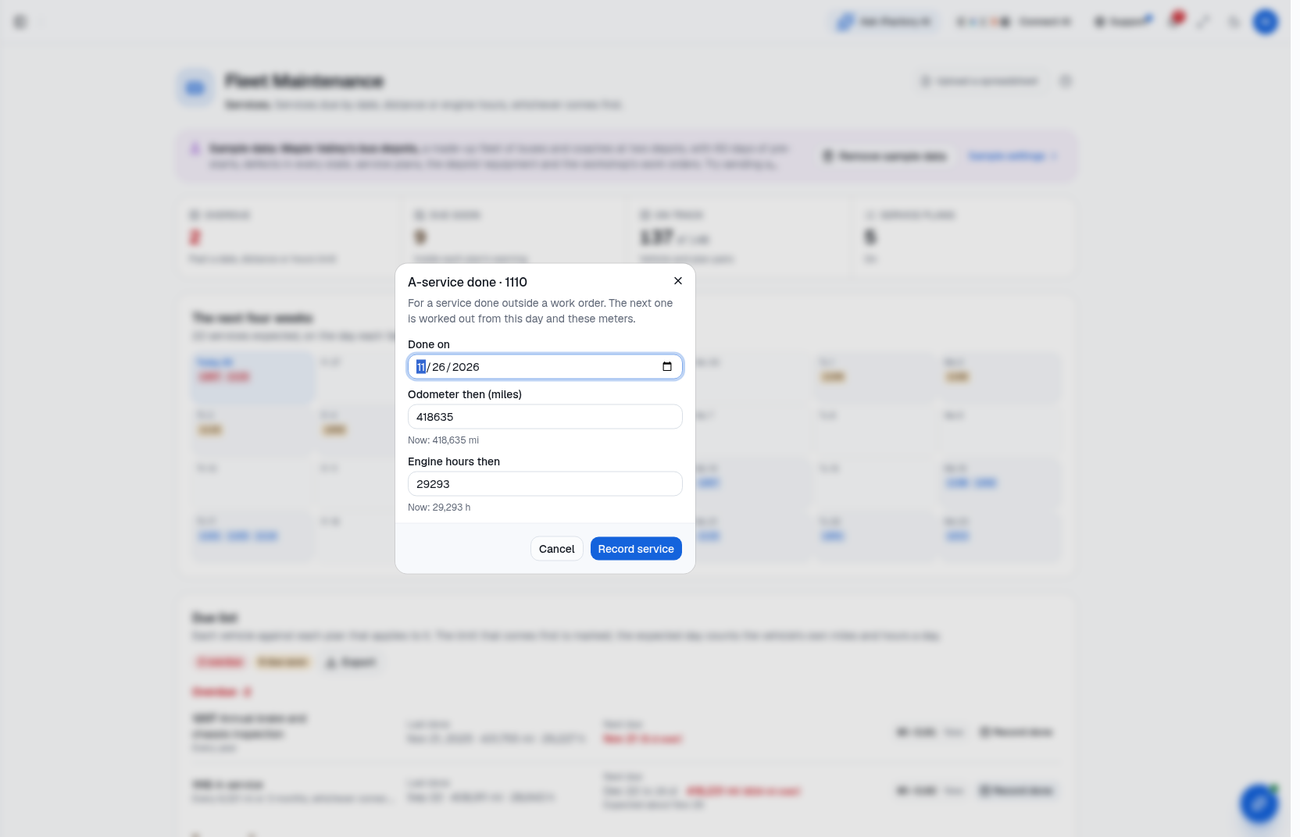
Entered when a job is done, so a service resets the hours the next due point is counted from.
CSV
Import hours together with odometer readings when you collect them in another system.
API
Pushed from your own systems, such as a telematics platform that already reads the meter.

Hours or distance
The choice is made per plan, and the right one depends on how the vehicle wears.
Count hours when
Vehicles idle for long periods, the service is tied to engine running, or an hour meter is fitted and used.
Count distance when
The wear follows kilometres or miles, a date backstop is enough, or no hour meter is fitted to the vehicle.
Keeping hours trustworthy
An hours-based plan is only as good as the readings that feed it.
Mark the hour meter
Tick the hour meter on each vehicle that has one, because the plan ignores hours for vehicles that are not marked.
Enter hours at every check
Regular readings keep the expected date accurate, since it uses the average of the last 30 days.
Keep a date backstop
Add a date limit so a vehicle that barely runs still gets its service on time.
Why hours matter
Distance alone can hide how hard an engine has worked, especially on vehicles that spend long periods stationary with the engine running.
Idling is wear
A bus waiting at a terminal adds hours but little distance, so a plan that counts only miles or kilometres can fall behind the real condition of the engine.
Whichever comes first
Putting hours, distance and date on one plan means the service is due as soon as any limit is reached, with no second schedule to maintain.
Frequently asked questions
Does every vehicle need an hour meter?
No. Hours limits only apply to vehicles marked as having an hour meter in the register. Vehicles without one use distance and date only, even when they share a plan with vehicles that do have a meter, so a mixed fleet can run on one plan without extra setup.
What is the sample interval?
The sample is an air-con service every 1,500 engine hours or six months, whichever comes first. It shows how a single plan can carry an hours limit and a date limit together, so a bus that idles at terminals reaches its service by hours even if the calendar has not yet caught up.
When does a service turn Due soon?
A service turns Due soon 50 hours ahead of its limit by default. You can change the lead on the plan, so a longer job that needs parts ordered can warn earlier. When the lead is reached, one work order is raised for the cycle with the tasks and estimated hours.
How is the expected date worked out?
It is worked out from the average daily hours over the last 30 days, and it is shown for each vehicle that has an hour meter. A vehicle that has worked harder recently reaches its limit sooner, so the date moves as its use changes, which helps the workshop plan bays ahead.
Where do I read about distance-based plans?
The mileage-based maintenance schedule page explains distance limits and how they combine with hours and date, and the Fleet Maintenance tool page lists every feature. Both use the same sample fleet, so you can compare an hours plan with a distance plan directly in the app.
Can one plan use hours, distance and date together?
Yes. A single plan can carry all three limits, and the service falls due at whichever is reached first. When the lead is reached, a work order is raised once per cycle with the plan tasks and estimated hours, and recording the service sets the next due point from that day.
Count the hours that matter
Hours, distance and date in one plan, with an expected date for every vehicle.
- Hours alongside distance
- Expected date per vehicle
- Due soon 50 hours ahead
14-day free trial