A hazard communication program is the written document your plant keeps under 29 CFR 1910.1200(e), and the 2024 revision asks employers to bring it up to date. HazCom 2024 update does not write that program for you. What it does is record, once for the whole plant, that the update was finished: the date, and the name of the person who recorded it. That record then appears on the overview and in the status PDF next to every chemical's SDS, label and training dates. This page covers what the written program has to contain, what the module records about it, and how to keep the two in step. You can record your program update in the module once the document itself is revised.
Plant-wide step · Written HazCom program updated
Record the program update once, with a date and a name
One line in the For the whole plant card. It reads "Not done yet" until an owner or admin records the day the revised program was finished.

What paragraph (e) asks the written program to contain
The text below follows 29 CFR 1910.1200(e) and the help text on the module's plant step.
For substances, the effective-date paragraph says employers shall, as necessary, update the hazard communication program no later than November 20, 2026. That date has passed; for mixtures it is May 19, 2028.
Show when the program was brought up to date
Record the finish date once, and it travels with every status PDF you export.
How the plant step looks before and after
The step lives in the For the whole plant card, above the chemical table, with a count of how many of the two plant steps are done.

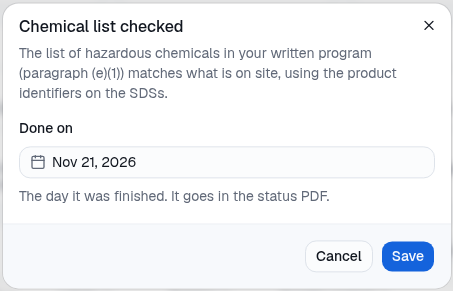
Record date
A short form asks for the Done on day and explains that this day prints in the status PDF.
Done, with a name
Once saved, the line shows "Done" with the date and the name of the person who recorded it.
Change
If the date was wrong, Change lets an owner or admin correct it later.

Keeping the document and the record in step
Revise the document
Update your written program in your own document system, covering the points paragraph (e) lists.
Use the chemical list as input
Export CSV for Excel to see every chemical, its work areas and which steps are still open while you revise.
Record the finish date
An owner or admin clicks Record date on Written HazCom program updated and enters the day the revision was finished.
File the PDF beside it
Export the status PDF. Its For the whole plant table prints the step with what it covers, the date and Recorded by.
Why the program is a plant step, not a chemical step
Labels, safety data sheets and training change chemical by chemical, so the module tracks them on each record. The written program is one document for the workplace. Tracking it per chemical would create dozens of copies of the same fact. The module therefore keeps it, together with the chemical list check, in a short list of company-wide steps stored once for your company and shown to everyone who uses the module.
Paragraph (e)(4) also says the written program must be made available, upon request, to employees, their designated representatives and OSHA. The module does not store the document, so keep it where those people can reach it, and let the recorded date point to the version that was current.
Still open after the substances date?
The module ties the plant steps to the same employer date as substances. If the program is still open, the card keeps showing it as not done until you record the day the update is finished.
What the module does not do for the program
Being exact here matters more than anywhere else on the list.
No template or draft
There is no written program template and no drafting feature in the module.
No document storage
The HazCom record has no file field for the program. Keep the document in your own system.
No content review
Recording the date says the update was done. It does not check what the program says.
Frequently asked questions
Who can record the written program step?
Owners and admins. Other people on the module see the line "An owner or admin records these."
Does the PDF show the program step if it is not done?
Yes. The For the whole plant table prints "Not done yet" for any plant step without a date.
Is the chemical list part of the same step?
No. It is the other plant step; see the chemical inventory list check.
How does this fit the other records the standard names?
The program is one of five; the hazard communication standard's five records page lists them all.
Can I see when it was recorded and by whom later?
Yes. The step keeps the Done on date and the recorder's name, on screen and in each PDF you export.
Close the program step with a date you can show
Revise the program your way, then record when it was finished so the status PDF tells the whole story.
- One plant-wide step, not one per chemical
- Date and recorder's name kept together
- Printed in every status PDF
14-day free trial · no card needed