Hazard communication software for the 2024 update should answer one question fast: where does each chemical stand? HazCom 2024 update is the iFactory module that tracks every chemical's move to the 2024 revision of the Hazard Communication Standard, 29 CFR 1910.1200. You upload the chemical list you already keep, record three dated steps per product, and record two steps once for the whole plant. A HazCom 2024 tracker then shows which chemicals are done, which are overdue and which are not due yet, and exports a status PDF for the EHS file.
OSHA Safety Records · HazCom 2024 update · 29 CFR 1910.1200
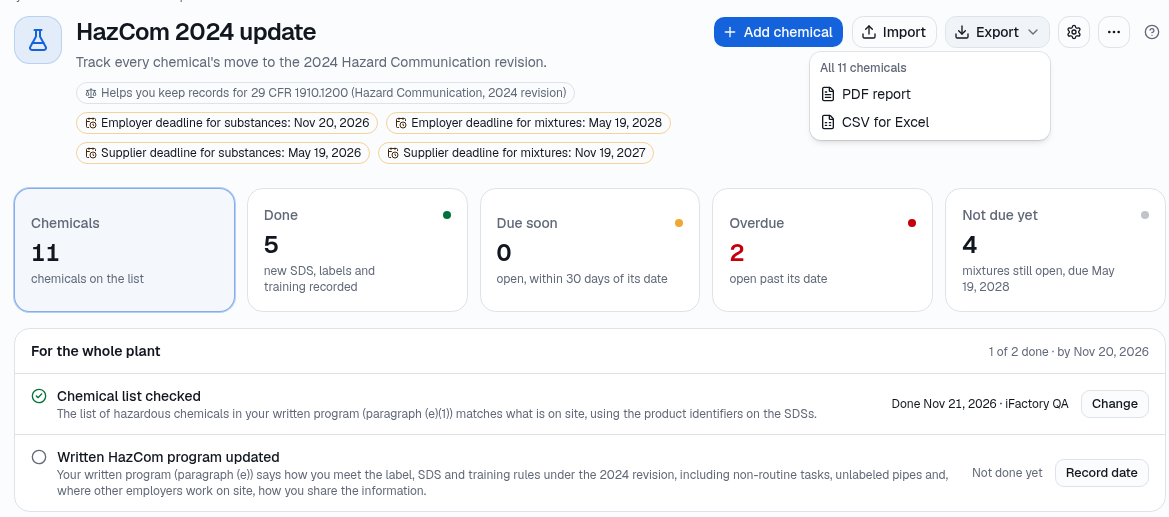
Every chemical's 2024 update, dated and in one list
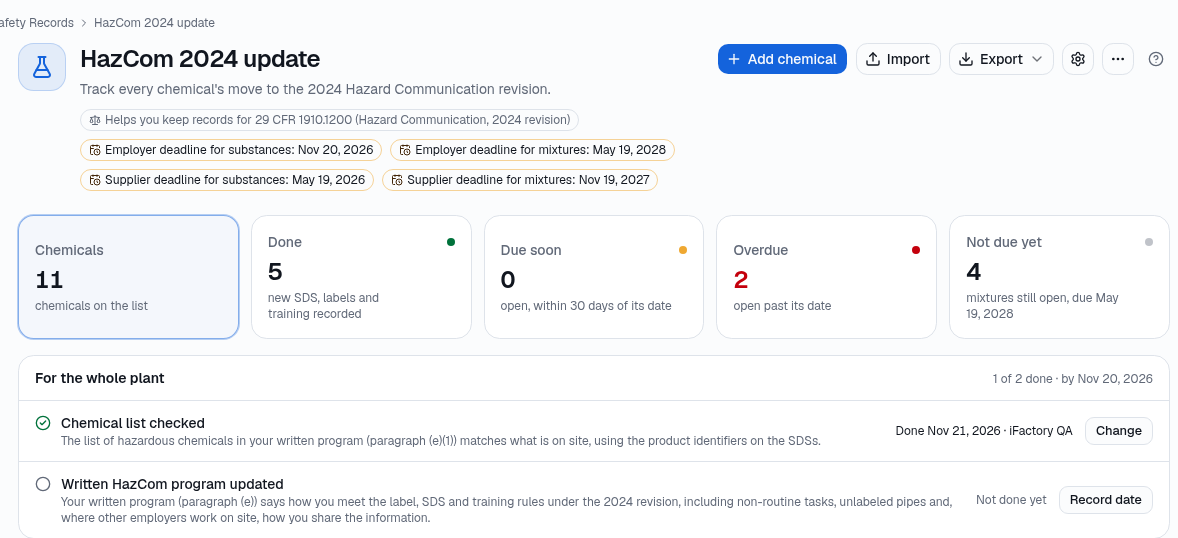
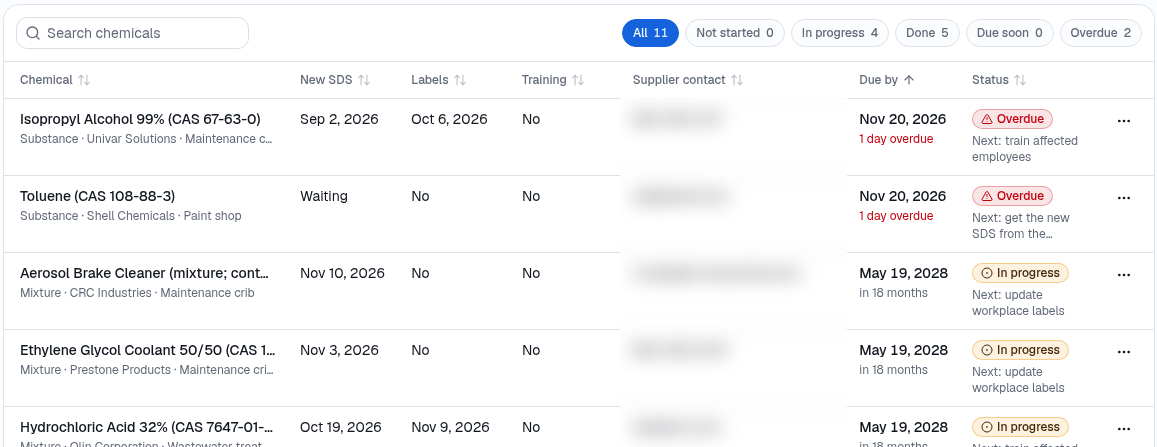
Track the new-format SDS, the workplace labels and the training for each chemical, each with the date it was done. The substances date has passed, so open substances show as Overdue. Mixtures are due by May 19, 2028.
The four OSHA dates, and where each one stands today
OSHA set staggered compliance dates for the 2024 revision and, in January 2026, moved all four dates four months later (91 FR 1695). Two are for chemical manufacturers, importers and distributors; two are for employers. The tracker gives each chemical the employer date for its kind, so you set Substance or mixture once and the Due by date follows.
Suppliers · substances
Employers · substances
Suppliers · mixtures
Employers · mixtures
Dates from 29 CFR 1910.1200(j) as amended by the final rule of January 15, 2026 (91 FR 1695). Employers update labels, the written program and training "as necessary" by their dates.
What the hazard communication software records
Each chemical gets three steps. The plant gets two. Every step stores the date it was done, so the record answers "when", not just "yes".
New-format SDS received
The date the supplier's 2024-format safety data sheet arrived. Until then the row reads "Next: get the new SDS from the supplier".
Workplace labels updated
Yes or no, plus Labels updated on. The next hint moves to "Next: update workplace labels" once the SDS is in.
Affected employees trained
Yes or no, plus a Training date for the chemical. When it is the last open step the row reads "Next: train affected employees".
Chemical list checked
Recorded once for the whole plant: the list in your written program matches what is on site, using the product identifiers on the SDSs.
Written HazCom program updated
Recorded once for the whole plant, with the date and who recorded it, under For the whole plant on the overview.
See your own chemicals by status
Upload the chemical list you keep today and the overview sorts it into Done, Due soon, Overdue and Not due yet.
How HazCom 2024 update works
Bring your chemical list
Choose Import and upload an Excel (.xlsx) or CSV file, then match its columns once. Product, manufacturer, supplier contact and work area are picked up. You can also use Add chemical for a single product. See chemical inventory import for the details.
Set Substance or mixture
This sets the Due by date: November 20, 2026 for substances and May 19, 2028 for mixtures. If you are not sure, Section 3 of the SDS says whether it is a substance or a mixture.
Record each step with its date
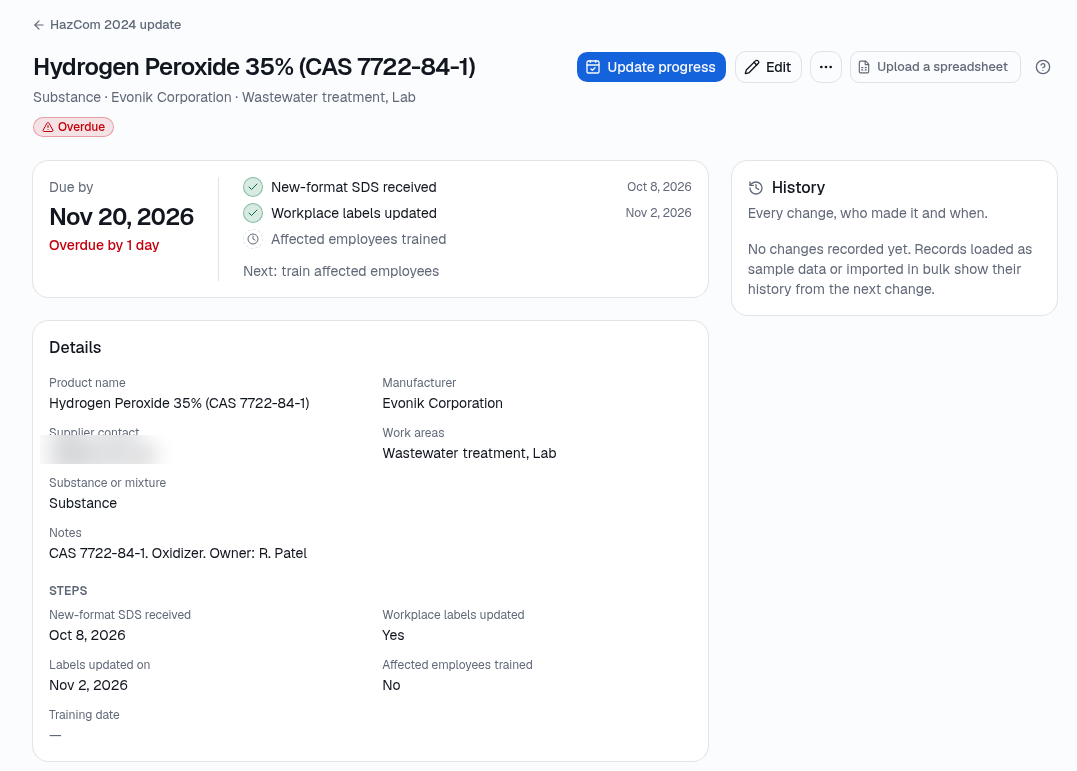
Open a chemical and choose Update progress. The Due by card shows the date, any overdue days and the next step. History lists every change, who made it and when.
Record the plant-wide steps
Under For the whole plant, use Record date for Chemical list checked and Written HazCom program updated.
Watch the cards and the weekly email
The overview counts Done, Due soon, Overdue and Not due yet, and a weekly reminder email lists what is coming due.
Export for the EHS file
Export gives a PDF report or a CSV for Excel of every chemical, with the plant steps and each chemical's steps done.
What you see in the portal
The chemical table lists every product with its New SDS, Labels and Training columns, Supplier contact, Due by and Status, plus a short "Next:" hint. Filter by All, Not started, In progress, Done, Due soon or Overdue, or use Search chemicals.
Due by and Next step
Each chemical page shows Due by with "Overdue by 1 day" or the time left, the three steps with their dates, and the next step to do.
Supplier contact beside open SDSs
Rows still waiting on a new SDS keep the supplier contact next to them, so the follow-up list is the table itself.
Status PDF and CSV
The PDF report shows the date, the five cards, the plant steps with Recorded by, and every chemical with Steps done and notes.

What the module does not do
It keeps your records for the 2024 update. It does not replace the work, or the other records, the standard asks for.
It is not an SDS library
It records the date each new SDS arrived. Keep the SDS files themselves where employees can reach them on every shift.
It does not make labels
It records that workplace labels were updated and when. Printing the labels is done outside the module.
It does not run the training
It records yes or no and a training date per chemical. Attendance lists stay in your training records.
Frequently asked questions
What are the HazCom 2024 deadlines for employers?
November 20, 2026 for substances and May 19, 2028 for mixtures. OSHA extended both dates by four months in January 2026. The substances date has passed, so an open substance shows as Overdue in the tracker.
Can I import our chemical list from an SDS binder or EHS system?
Yes. Export it to Excel or CSV, upload it and match the columns once. Product, manufacturer, supplier contact and work area are picked up, and the three steps start at not done unless your file has dates for them. Read how the chemical inventory import handles each row.
Does it replace our SDS register?
No. It tracks the move to the 2024 revision for each chemical. The SDSs themselves still need to be kept where employees can get to them.
How do we handle mixtures?
Set the chemical to Mixture and its Due by date becomes May 19, 2028. Section 3 of the SDS tells you whether a product is a substance or a mixture.
Who can see our records?
Only people in your company. Every change is logged with who made it and when, and shows in the chemical's History.
How do I try it?
Start the 14-day free trial with no card and load your own chemical list. You can start the free trial here.
Close out open substances and plan for 2028
Put every chemical, its three dated steps and the two plant steps in one list, then export the status for the EHS file.
- Three dated steps per chemical: SDS, labels, training
- Due by set from Substance or mixture
- Status PDF and CSV export, with a change history
Free for 14 days · no card needed