A chemical tracking spreadsheet is how most plants started the HazCom 2024 update, and it is a reasonable start. One row per product, a column for the new SDS, one for labels, one for training. The trouble comes later: nobody can see at a glance who still owes what, a date typed in the wrong format breaks a filter, and there is no record of who changed a cell. HazCom 2024 update, the iFactory module for 29 CFR 1910.1200, takes that same spreadsheet as its starting point. You import it once, and each row becomes a chemical with a status worked out from its dates. You can move your spreadsheet into the tracker without retyping it.
From Excel to tracker · HazCom 2024 update
Keep your chemical list. Lose the spreadsheet problems.
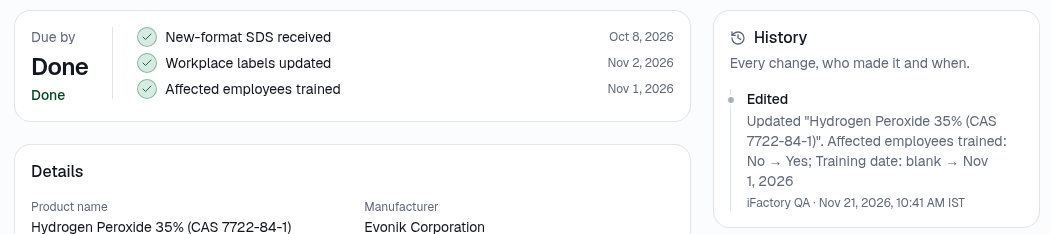
Your columns are matched once. After that, every chemical gets a Due by date, a status, a next step and a change history, and you can still export a CSV for Excel whenever you want one.
Spreadsheet vs the HazCom tracker
The list is the same. What changes is what the list can tell you without someone working it out by hand.
Bring the spreadsheet you already have
Upload the .xlsx or .csv, match the columns, and see every row with a status.
How the move works
Tidy the headers, not the data
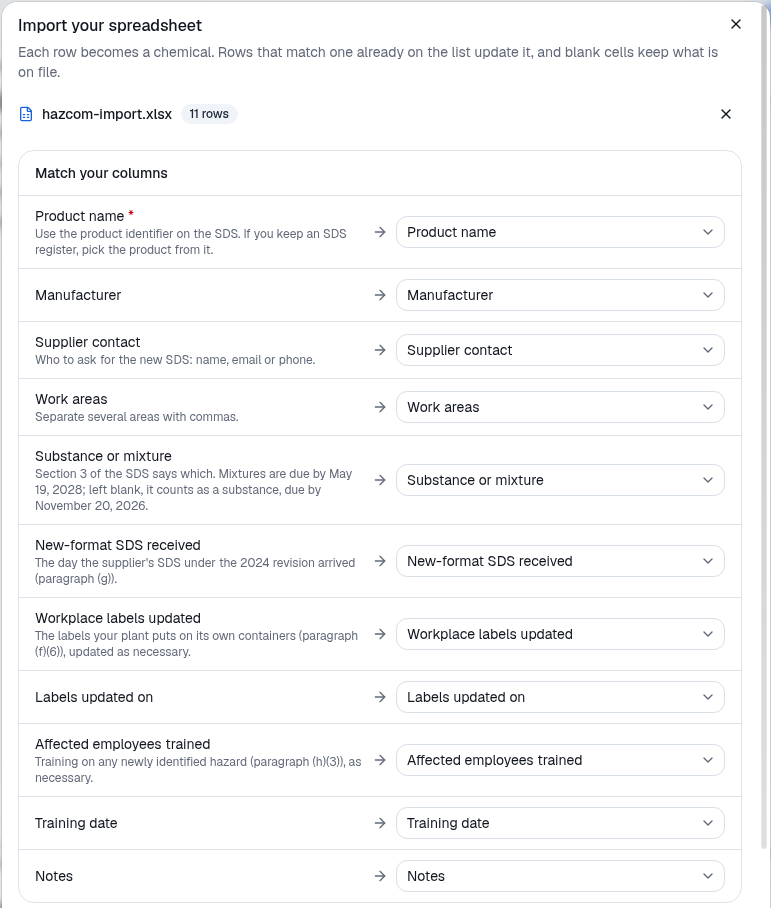
Common headers are recognised, such as "Trade name", "Vendor", "Relabeled" or "Date trained". You do not need to rename them.
Choose Import and match columns
Pick the file and confirm which column feeds each field. The full walkthrough is on the chemical inventory import page.
Read the result
The import reports how many chemicals were new, updated and skipped, with a reason for each skip.
Work in the tracker from now on
Record steps with Update progress. Importing the same list again updates matching rows instead of adding copies.
Export when someone wants a sheet
Export, then CSV for Excel, gives one row per chemical with every field, Due by and Status.
What your rows look like after the move
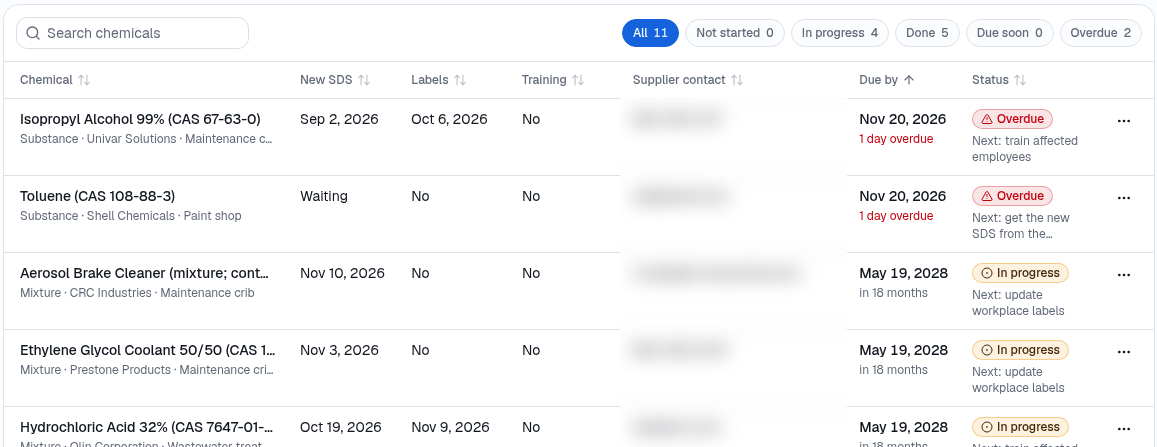
Each spreadsheet row becomes a chemical in the table, with New SDS, Labels and Training side by side, the Due by date and a status with its next step.
Matched on product and manufacturer
The same product from the same manufacturer is one chemical, so re-imports update it.
Row actions
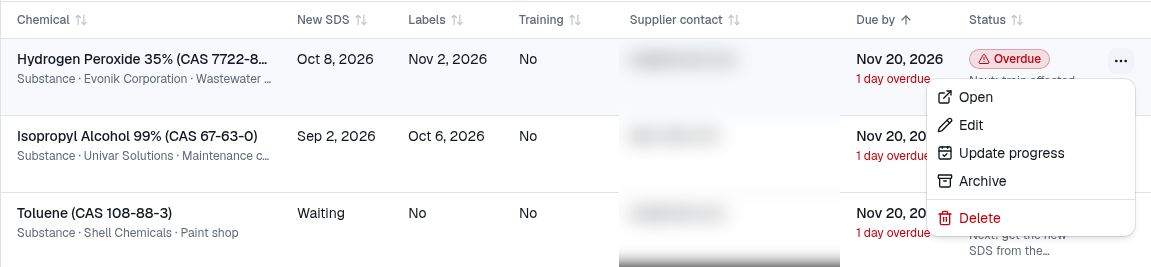
Each row's menu offers Open, Edit, Update progress, Archive and Delete.
Duplicates refused
Adding a product that is already on the list from the same manufacturer is stopped with a message.
Keep Excel for what it is good at
Moving to the tracker does not mean giving up spreadsheets. Bulk edits are still quicker in Excel: export the CSV, fill a column of training dates or correct a batch of manufacturer names, and import the file again. The import matches each row on product and manufacturer, so it updates the chemicals you already have instead of adding copies, and the report at the end tells you how many rows were new, updated or skipped. Day-to-day work, the status, the reminders and the history stay in the tracker.
What stays the same, and what does not move
A few things are worth knowing before you retire the file.
Extra columns are not kept as fields
There are no fields for CAS numbers, owners or hazard classes. Put anything you need into Notes or the product name.
History starts after import
Bulk-imported records show their history from the next change, not from the spreadsheet's past.
It is not your SDS register
The tracker covers the 2024 update steps. The SDS files themselves stay in your SDS system.
Frequently asked questions
How big can the spreadsheet be?
The import reads up to 5,000 rows, from an Excel (.xlsx) or CSV file up to 25 MB.
Our sheet already has SDS and training dates. Are they kept?
Yes, if the columns are matched. A date in a yes-or-no column, such as "Trained", also counts as yes.
Can we go back to Excel later?
Any time. Export a CSV for Excel with every field for every chemical.
What replaces our "status" column?
The status cards and filters. The HazCom dashboard page explains each status.
Can we edit in Excel and import again?
Yes. Export the CSV, change it in Excel and import it again. Rows that match a chemical already on the list update it, and blank cells keep what is on file.
Retire the spreadsheet, keep the list
Import it once, track every chemical with dates and statuses, and export a CSV whenever someone asks for Excel.
- Your columns matched once
- Status, Due by and next step per row
- History, reminders and a status PDF
14-day free trial · no card needed