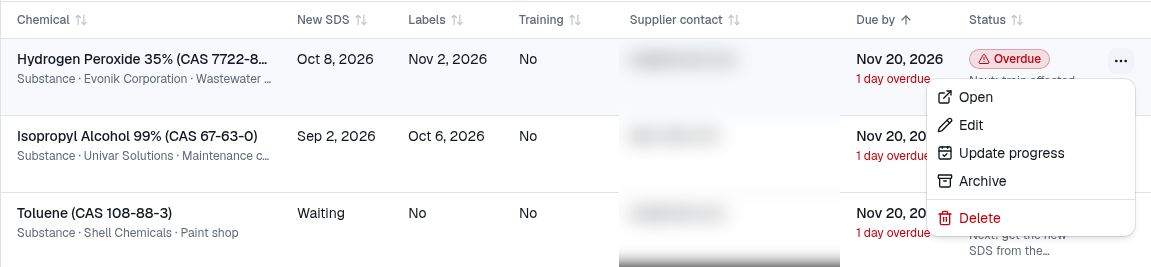
HazCom training records in HazCom 2024 update are kept per chemical: one step that says whether affected employees were trained on that product's new hazards, and the date it happened. It is the third and last step for each chemical in the iFactory module for 29 CFR 1910.1200, after the new SDS and the workplace labels. The help text ties it to paragraph (h)(3), training on any newly identified hazard, "as necessary". This page is plain about what the step holds and what it does not, so you can decide where it fits next to your training system. You can record training per chemical and see which products still need it.
Step 3 of 3 per chemical · paragraph (h)(3)
A training date on every chemical with new hazards
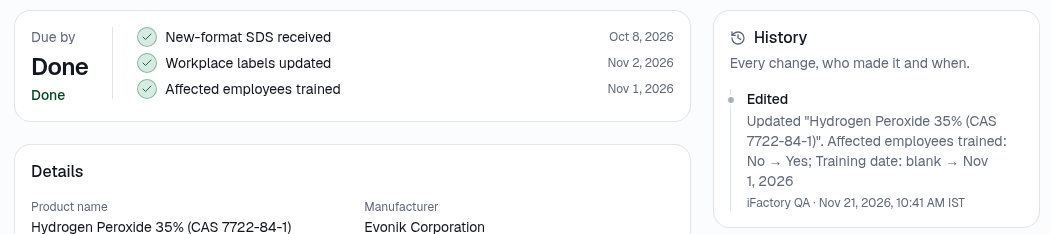
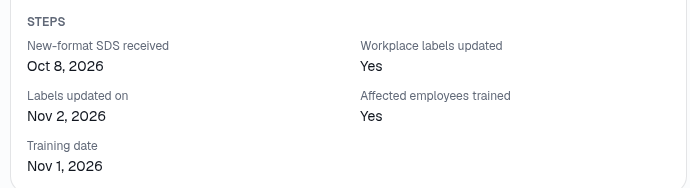
Tick Affected employees trained, pick the Training date, and the Training column shows it. When training is the last open step, the chemical turns Done the moment you save.
What the 2024 update asks for on training
Paragraph (j)(2)(ii) asks employers, as necessary, to provide additional employee training under paragraph (h)(3) for newly identified physical, health or other hazards, alongside the label and written program updates. The trigger is new hazard information, which usually reaches you on the supplier's new SDS. That is why the module asks for training last: the SDS shows what changed, the labels reflect it, and the people who work with the product are trained on it.
Dates that apply
November 20, 2026 for substances, which has passed, and May 19, 2028 for mixtures. A substance with training still open shows as Overdue; an open mixture counts under Not due yet.
The training record, exactly
Two fields under Steps, plus the history behind them.
Affected employees trained
Yes or no for the chemical. A date in this column on import also counts as yes.
Training date
The day the training was done. Past dates only.
Training column
Shows the date, "Yes" without a date, or "No". Printed the same way on the status PDF.
History entry
Saving logs the change, for example "Affected employees trained: No → Yes; Training date: blank → Nov 1, 2026", with who and when.
Find the chemicals waiting on training
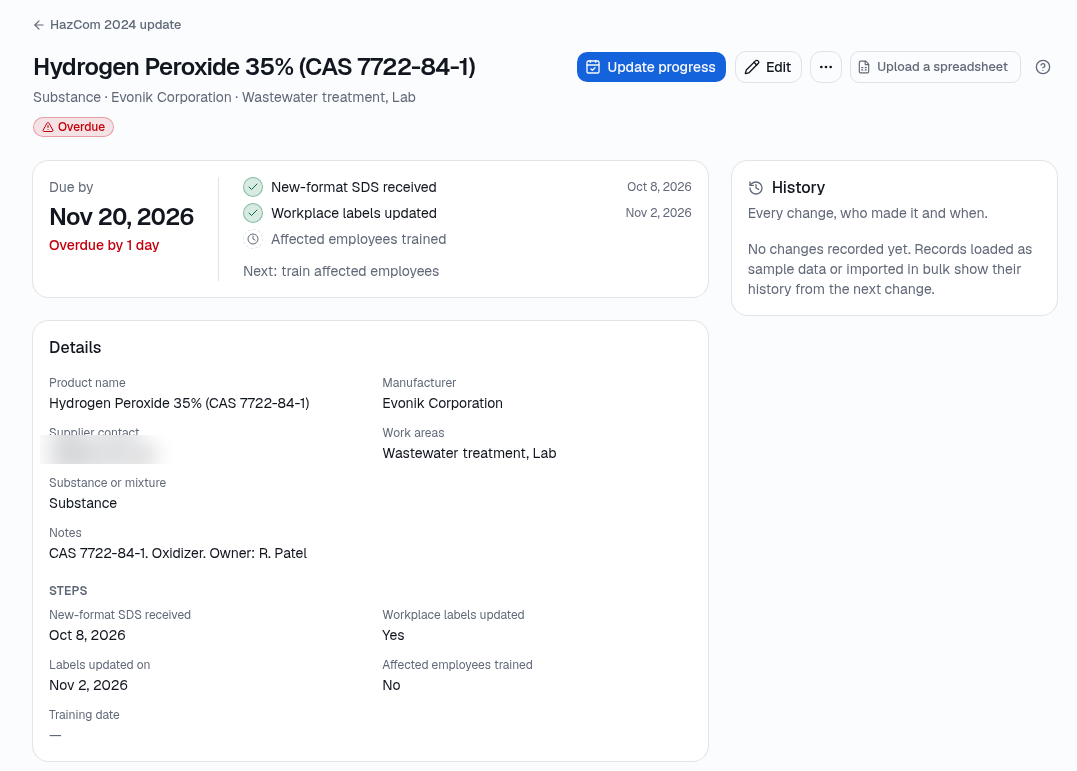
Rows whose last open step is training read "Next: train affected employees".
How to record HazCom training
Train on the new hazards
Use the new SDS and the updated label as the source for what changed for that product.
Keep attendance where you keep it now
Sign-in sheets, course content and names stay in your training system or file.
Open the chemical and choose Update progress
Tick Affected employees trained and pick the Training date.
Use Notes to point to the record
A short note such as the session name or where the sign-in sheet is filed helps the next reader.
Import dates in bulk
Headers such as "Employees trained", "Training complete" or "Date trained" are matched when you import a spreadsheet.
Training in the portal
The chemical's Steps section shows all three dates together, so training is read against the SDS and label dates that came before it.
Next hint
"Next: train affected employees" shows on the row and the chemical page when training is the step left.
Due by and overdue days
The Due by card counts the days overdue for a substance with training still open.
On the report
The HazCom status report PDF prints the Training date for every chemical.
Using work areas to plan the sessions
Each chemical record carries Work areas, a comma-separated list such as "Maintenance crib, Assembly". Search or sort by product, then read the work areas on rows that still say "Next: train affected employees". Grouping those rows by area gives you a short list of sessions: one for the paint shop, one for wastewater, and so on. After each session, record the date on every chemical it covered. The status PDF then shows the training dates next to the SDS and label dates.
What this training record is not
It shows that the training for a chemical's new hazards was done, and when. Nothing more.
Not a roster
No employee names, trainers, sign-offs or test scores. One yes or no and one date per chemical.
Not an LMS
No course content and no connection to a learning system. Keep those where they are.
Not "not needed"
If a review finds no new hazard, there is no "not needed" option. Write your decision in Notes; the step stays open until dated.
Frequently asked questions
Is training tracked per employee?
No. It is tracked per chemical. Employee-level records belong in your training system.
We train by hazard class, not by product. Does that work?
Yes, with care. Record the session date on each chemical whose new hazards it covered, and note the session in Notes.
Can I record a planned training date?
No. Dates are past-only. Note the plan, then record the date once the session has happened.
What makes a chemical Done?
All three steps recorded: the updated SDS, the workplace labels and the training.
Who are the affected employees for a chemical?
The people who work with or near it. Each chemical's Work areas field, such as Paint booth or Wastewater treatment, helps you find them.
Is the training date in the CSV export?
Yes. The CSV has both Affected employees trained and Training date for every chemical.
Close each chemical with its training date
Record the training for every product with new hazards and see the list turn Done.
- Yes or no plus a date per chemical
- Next hint when training is the last step
- Training date on the PDF and CSV
14-day free trial · no card needed