Most inspection checklists are written once and then left alone, so they keep asking about things that never go wrong and miss the thing that does. iFactory Inspection reviews them for you. A set of coded rules reads your own rounds and work orders every day, iFactory AI words what it finds, and a person decides whether to apply it. This page explains the seven signals the review looks for, how a suggestion is handled and what is deliberately kept out of its reach. We have not yet had weeks of rounds in our QA account, so there is no screenshot of a live suggestion here. Try it on your own rounds once your company is set up.
Inspection · Checklist review
A checklist review that runs on your own records
Seven signals from your rounds and work orders become suggested changes, each with the records behind it. You decide what to do with every one: apply it, edit it or dismiss it.

The seven signals
Coded rules look for these patterns, and they are rules, not AI guesses. The AI only words the suggestion, so the evidence cannot be invented.
Repeat failure
An item that failed in 3 or more of the last 10 rounds on an asset
The suggestion is to take a closer look at that item, because a repeat failure is either a real problem with the machine or a poorly written item.
Just over the limit
Failures just over the pass limit
This signal points at limits that may be set too tight or too loose, and the person reviewing it decides which, using the records behind the suggestion.
Same note again
The same failure note written again and again
The suggestion is that the item needs a clearer instruction, because the same note written again and again usually means the how-to-check line is not saying enough.
Always N/A
An item marked N/A in 8 of the last 10 rounds
This signal asks whether the item belongs on that checklist at all. An item that is nearly always N/A may be written for a different machine.
Never fails
An item that has not failed in 12 or more rounds over six months
The item is a candidate for retiring, so a checklist does not grow longer for ever. The rule never proposes it for safety, lockout or urgent items.
Uncovered cause
A cause behind 3 or more work orders in 180 days that no item checks
The suggestion is a new item that checks that cause, so a fault that keeps producing work orders is finally covered by the round.
Not reviewed
A checklist not reviewed in a year
The signal prompts a review of how the checklist is used, and the person reviewing it decides whether anything needs to change.
The thresholds are as set in the app's rules on 26 Nov 2026 and may change. Check the app for the current values before you quote them.
Let the records say which items to change
Nothing changes on its own, and an applied change can be undone. A person is always the one who decides.
What happens to a suggestion
From signal to saved change, step by step.
- A rule firesThe daily run finds one of the seven signals on a checklist, based on the rounds and work orders recorded on its assets.The app keeps this manageable with limits: one suggestion per item and five per checklist, so the list stays short enough to read.
- iFactory AI words itThe suggestion is written in plain language and links the records behind it, so the reviewer can open the rounds and work orders that triggered it.Suggestions appear in the app only. No email is sent, so the reviewer needs to look in the app to see what is waiting.
- A person reviewsYou read the records and decide. The suggestion is a prompt to look, not an instruction to change.There are three choices: apply the change as written, edit it first, or dismiss it if it is not right for your site.
- Applied changes are versionedAn applied change creates a new version of the checklist, and past rounds stay linked to the version they used.An applied change can be undone, which brings back the previous version if the change turns out to be wrong.
The rounds the review reads
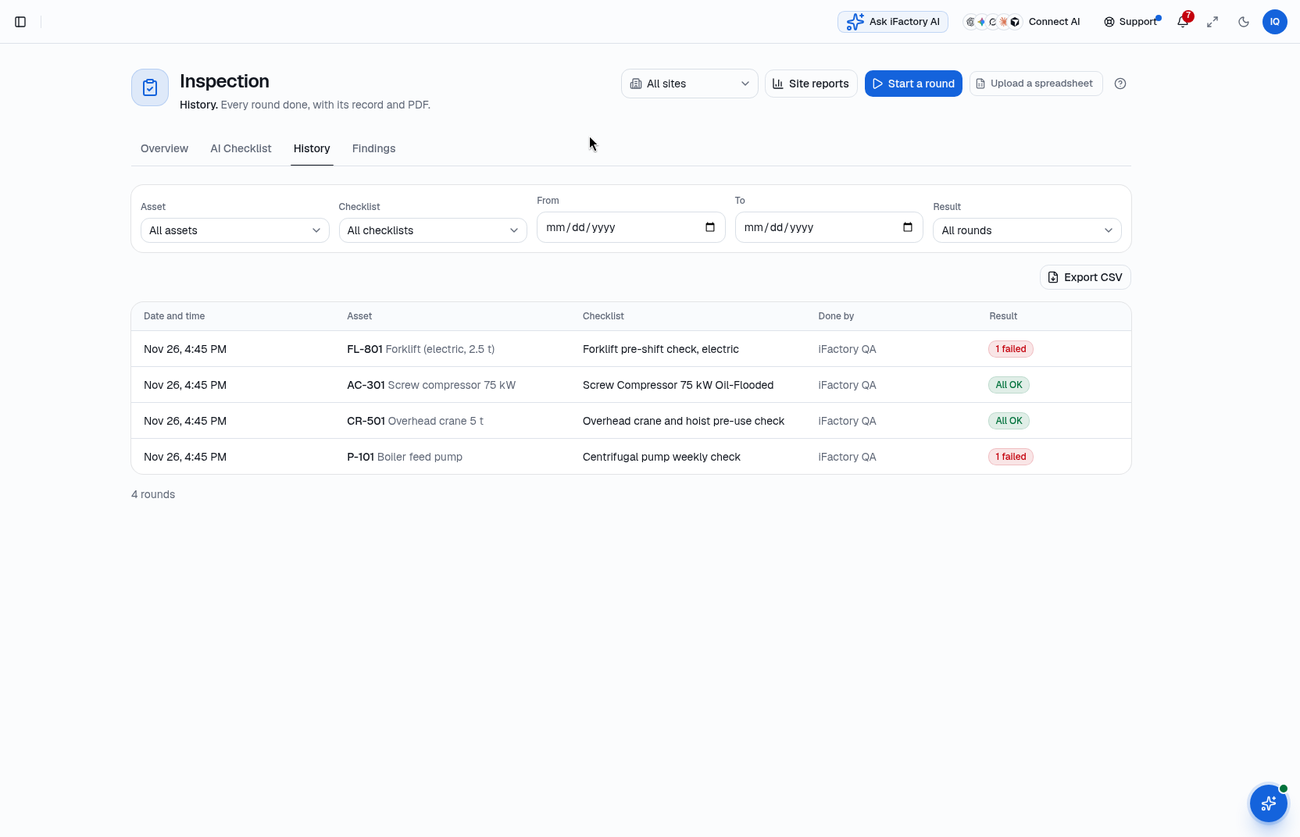
The signals come from the History of rounds and from work orders. History lists each round with who did it, when and how many items failed, so a pattern such as the same item failing again is a pattern in records you can open yourself.
Rounds
Every submitted round is kept with its results.
Work orders
Findings and maintenance work orders on the same assets.
Checklist versions
Past rounds stay linked to the version they used.
What the review does not do
It suggests. It does not rewrite your checklists.
Not instant
Needs weeks of rounds before a signal can fire, and the check runs daily, with a Check now option limited to 6 an hour.
Capped use of AI
The app limits AI wording to 12 calls a day.
Protects safety items
Safety, lockout and urgent items are never suggested for retirement.
Reading a suggestion
A suggestion is a short statement of what the records show and what change the rule proposes. It names the item, quotes the evidence behind it, such as how many of the last ten rounds an item failed on an asset, and proposes a plain change: an item added, a limit tightened, a section or priority changed, the checklist done more often, an item retired or the checklist marked as reviewed.
iFactory AI may reword a suggestion so it reads better, but the evidence is never rewritten. If the AI is busy or down, the rule's own wording stays.
Safety items are protected
The review never suggests retiring a safety check, a lockout step or an Urgent item, however quiet it has been. A guard or an e-stop that never fails is doing its job. The review also gives at most one suggestion per item and five per checklist, strongest first, and thin data gives no suggestion at all.
The check runs for each company about once a day and when an owner or admin presses Check now. It stays in the app and does not send email. Each suggestion can be applied, edited or dismissed, and a dismissed one comes back only when its evidence has grown.
Frequently asked questions
How does iFactory Inspection suggest checklist changes?
A set of coded rules reads your rounds and work orders every day and looks for seven signals, such as an item that failed in 3 or more of the last 10 rounds. iFactory AI words the suggestion and links the records behind it, and a person decides whether to apply, edit or dismiss it. Suggestions appear in the app only.
Does the AI change my checklist by itself?
No. It suggests, and a person applies, edits or dismisses every suggestion. An applied change creates a new version of the checklist and can be undone, and past rounds stay linked to the version they used. The AI only words the suggestion, and it never rewrites the evidence behind it, so the records are always the real ones.
What counts as a repeat failure?
An item that failed in 3 or more of the last 10 rounds on an asset. The rule suggests a closer look at that item, and it may point at a limit that is set too tight or too loose. The thresholds are as set in the app's rules on 26 Nov 2026 and may change, so check the app for current values.
Will it suggest dropping a safety check?
No. An item that has not failed in 12 or more rounds over six months can be suggested for retiring, but never if it is a safety, lockout or Urgent item. A long run of passes on those items is the expected result, not a reason to stop asking. A person still has to approve any retirement.
How often does it run, and are there limits?
The review runs daily, with a Check now option limited to 6 an hour. It needs weeks of rounds before a signal can fire. There is one suggestion per item and five per checklist, and the app limits AI wording to 12 calls a day. If the AI is busy or down, the rule's own wording stays.
Will it email me suggestions?
No. Suggestions appear in the app only, and no email is sent. A person has to open the app to see what is waiting. That keeps the review quiet for people who have nothing to act on, but it means someone should look at the suggestions after a few weeks of rounds.
Review your checklists from your own records
Let repeat failures and uncovered causes point at what to change.
- Seven signals from rounds and work orders
- Records behind every suggestion
- Versioned, undoable changes
14-day free trial · no card needed