Searching for equipment inspection checklists usually ends in a PDF with blank boxes and no idea what counts as a pass. The checklists in iFactory Inspection are written the other way round: every item says how to check it and what passes, so two people looking at the same pump reach the same answer. This page lists the eight ready plant-equipment checks, shows how each is set up and what you do to put one into use. Open the ready checklists in your own workspace once your company is set up.
Inspection · Ready checklists
Eight ready plant-equipment checklists, each with limits
Pumps, conveyors, compressors, motors, gearboxes, cranes, cooling towers and hydraulic power units. Pick one, set who does it, and the rounds appear as due.

The eight plant checks, one line each
These are the eight plant-equipment checklists in the ready library. Each line gives the equipment, the number of items and how often the round is meant to be done.
Item counts are from the ready library in the QA account on 26 Nov 2026. Check every limit against the OEM manual before you rely on it.
Start from a written checklist, not a blank form
Every item in a ready checklist already has its section, its priority, a how-to-check line and a pass limit. That is the main difference from a blank paper form.
From the library to a round on the home screen
Putting a ready checklist to work takes four short steps, and none of them needs a file to be printed or handed out.
Pick the checklist
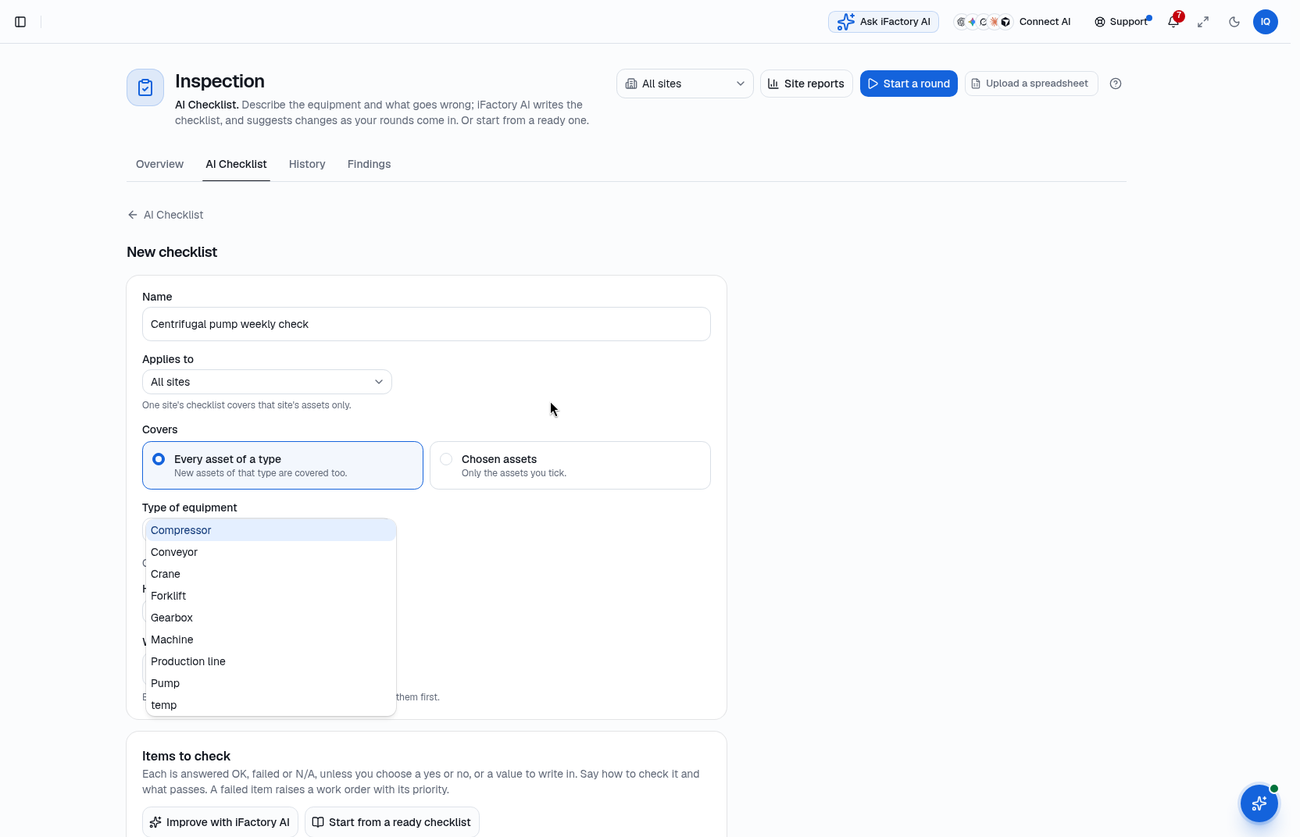
Open AI Checklist and choose a ready one. Each opens as a new checklist that you can edit freely before it is saved.
Choose what it covers
Choose whether the checklist covers every asset of a type, such as every pump, or only the chosen assets, and optionally one site.
Set who and how often
Pick the person or role who does the round, and choose how often. The ready checklist comes with a sensible frequency that you can change.
Save it
Once it is saved, its rounds show as due on the home screen for every asset it covers, and the technician can start them from there.
Also in the ready library
Besides the eight plant checks, the library holds food plant rounds, a pre-operational sanitation inspection (12 items, every shift) and a GMP plant walk (14 items, weekly), and an electric forklift pre-shift check, which we ran in the QA account. If your equipment is not on the list, iFactory AI can draft a checklist from a short description instead.
What the ready checklists are not
The ready checklists are a good starting point, and they are honest about what they are not. Knowing those limits avoids unpleasant surprises later.
Not your OEM limits
The limits are general figures. Compare each one with your maker's manual and edit the items that differ before the first round.
No downloads
The checklists are used inside the app. They are not offered as a document to download and print.
Results, not readings
Each item is answered OK, Failed or N/A, so a passing reading is not stored as a number. Failed items carry a note where the reading can be written.
Choosing which ready checklist to start from
The ready library is organised by equipment, so the quickest way to choose is to look at what your technicians actually walk past. A plant with a pump house, a packing line and a compressor room would begin with the pump, conveyor and compressor checks. The crane check is the odd one out: it is meant to be done by the operator before first use each shift and takes about five minutes, while the others are weekly, daily or monthly rounds.
Starting from a ready check does not lock you in. It opens as an editable checklist, so you can delete an item that does not apply to your machine, change a limit to match the nameplate or the manual, and add an item of your own. Only then do you save it and set who does it.
Reading an item the way the technician will
Every item has a section such as Safety, Mechanical, Lubrication, Electrical, Instruments or Housekeeping, a priority from Low to Urgent, a line saying how to check and what passes, and a lockout flag where the machine must be isolated first. The flag is why the coupling item on the pump reads as a locked-out check while the guard item does not.
When an item fails, the work order it raises takes the priority of the item, so an Urgent fail is due in four hours and a High one in 24.
Frequently asked questions
What are the ready equipment inspection checklists in iFactory Inspection?
Eight plant-equipment checklists in the library: pumps, conveyors, compressors, motors, gearboxes, cranes, cooling towers and hydraulic power units. Each opens as a new checklist you can edit. Every item has a section, a priority, a how-to-check line and a pass limit, and lockout steps are flagged.
Does every item say what passes?
Yes. Each item has a how-to-check line that names the tool or the look and a pass limit, such as OK below 70 °C. That is the main difference from a blank paper form, where two people can look at the same machine and give different answers. The limits are general, so check them against your own manual.
Can I change a ready checklist?
Yes. A ready checklist opens as a new checklist, and you can edit any item, limit, priority or frequency before you save it. The library copy is not changed. If your pump has different limits to the ready one, edit the item once and every later round will use your version.
What if my machine is not in the library?
Start from the closest ready checklist and edit it, write one by hand, or let iFactory AI draft one from a description of the machine and its faults. Any draft is only a starting point, so a person has to check every limit against the maker's manual and save the checklist before it is used.
Do the ready checklists need iFactory AI?
No. The eight ready checklists work without it, and you can use and edit them straight away. iFactory AI is a separate way to draft a checklist from a description when your machine is not covered. It can also suggest changes when the same item keeps failing, but a person must apply or dismiss them.
How long does a ready round take?
The weekly and monthly technician checks are designed to take around 15 minutes each, while the conveyor round is a daily operator walk-round of about the same length. The timing assumes the technician has the tools to hand, such as an IR gun, a vibration pen and a clamp meter, and that lockout steps are done together.
Put a ready equipment checklist to work
Pick the check, choose the assets and let the rounds appear.
- Eight plant checks with limits
- Lockout steps flagged
- Edit any item before you save
14-day free trial · no card needed