
How often should equipment be inspected? Only the maker's manual, your site rules and the machine's own history can answer that, and a software page should not pretend otherwise. What the software can do is hold the answer you chose and make sure the round turns up when it is due. This page explains how inspection frequency works in iFactory Inspection: the four choices, how the next due time is worked out and where the ready checklists start. Set frequencies in your own workspace once your company is set up.
Inspection · Frequency
Set inspection frequency per checklist and let due times follow
Four choices: every shift, daily, weekly or monthly. The next due time is the last round plus the frequency.

The four frequencies
Frequency is set on the checklist and not on the asset, so every asset that the checklist covers follows the same interval. If one machine needs a different rhythm, give it its own checklist.
In the app a shift is eight hours, daily is 24 hours, weekly is one week and monthly is 30 days. The intervals are fixed lengths, not calendar dates.
Set the interval once, then run the rounds
A round that has never been done is due straight away. After the first one, the clock starts from the time the last round was done.
How the next due time is worked out
The next round falls due one frequency after the last one, and not at a fixed time on the calendar. That keeps the gap between rounds the same even when one is late.
Last round
Pump weekly check
Wednesday
Next due
The following Wednesday
Due now
If a round is done late, the next one is counted from when it was actually done. The clock moves with the real work and does not try to catch up.
Where the ready checklists start
Each ready checklist comes with a sensible starting frequency, such as weekly for the pump or monthly for the motor, and you can change it when you save the checklist.
What the home screen does with the interval
Rounds are sorted into Overdue, Due today and Coming up, with a footer saying how many checklists cover how many assets. Archived checklists and archived assets drop out and cannot be run.
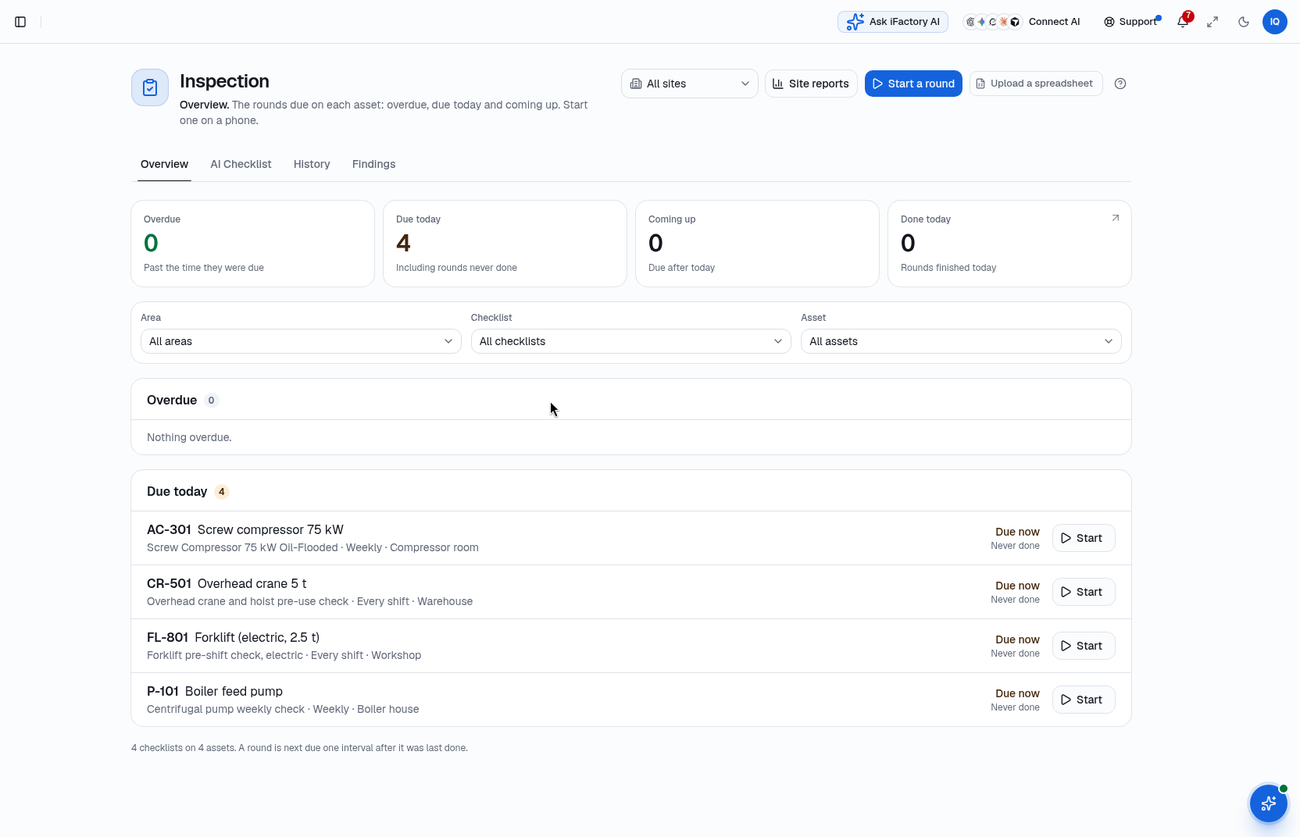
Overdue
Rounds past their due time are listed first, so the oldest missed round is the first thing the technician sees on opening the app.
Due today
Rounds that fall due today follow the overdue ones, so the technician sees what needs doing now without scrolling.
Coming up
Rounds that are coming up are listed after that, so a technician can plan the rest of the day and see what is on the way.
Choosing a frequency you can defend
Start from what the manufacturer says for the machine, then adjust for how hard it works and what happens if it fails. A pump that runs two shifts on boiler feed is worth looking at more often than a spare. The checklist library helps by showing common starting points: the crane before first use every shift, a conveyor daily, a pump or compressor weekly and a motor monthly. They are starting points, not rules, and the page does not tell you your interval.
Because frequency belongs to the checklist, you can keep two checklists on the same asset with different intervals. A quick daily walk-round and a deeper weekly check each get their own due time, which is cleaner than one long form done at an awkward rhythm.
What happens when a round is late
The next due time is counted from when the round was actually done. If a weekly check due on Wednesday is done on Friday, the next one is due the following Friday. This keeps the gap between rounds honest rather than squeezing a late round and an on-time round together.
Overdue rounds are sorted first on the home screen, then those due today, then what is coming up, so the person planning the day sees the late ones before anything else. A checklist that has never been done is due now, which is useful the day you save a new one.
If the interval turns out to be wrong, edit the checklist. A failure that keeps coming back is a reason to shorten it; a long run of clean rounds is a reason to ask whether it is the right length. Suggested checklist changes can point at both.
Review the interval
After a few months of results, ask whether the interval is right. An item that never fails at weekly may not need it, and one that fails often may need to be checked more.
Frequently asked questions
How do I set inspection frequency in iFactory Inspection?
When you save a checklist, choose one of four frequencies: every shift, daily, weekly or monthly. The frequency belongs to the checklist, so every asset it covers follows it. Each ready checklist comes with a sensible starting choice, and you can change it when you save, or edit the checklist later.
When is the next round due?
One frequency after the last round was done, not at a fixed calendar time. A weekly round done on a Wednesday is due again the following Wednesday. A round that has never been done is due now, and a round done late moves the clock, because the next one is counted from when it was actually done.
Does the app tell me how often to inspect?
No. How often a machine should be inspected depends on the maker's manual, your site rules and the machine's own history, and the app does not pretend to know. It holds the interval you chose and makes sure the round appears when it is due. The ready checklists only offer a sensible starting point.
Where do overdue rounds show?
On the home screen, where rounds past their due time are listed first, then the ones due today, and then those coming up. That order lets a technician see the oldest missed round straight away and plan the rest of the day. Findings from any round are tracked separately in the Findings tab.
How long is a shift, a day and a month in the app?
A shift is eight hours, a day is 24 hours, a week is one week and a month is 30 days. They are fixed lengths and not calendar months, so a monthly round is due 30 days after the last one. Pick the frequency that matches how the checklist is meant to be done at your site.
Can two checklists cover the same asset at different frequencies?
Yes. A checklist chooses its own assets and its own frequency, so one asset can have a short daily checklist and a longer monthly one. That suits a critical machine that needs a quick daily look and a deeper monthly check. Each checklist keeps its own due time and history.
Make every round turn up on time
Pick the interval per checklist and the due list does the rest.
- Every shift to monthly
- Never-done rounds due now
- Overdue, due today, coming up
14-day free trial · no card needed