The difference between a paper inspection sheet and a digital one is not the tick. It is what happens after the tick. A paper sheet records the round, and the defect waits until someone reads it and writes a job. This page compares the two on the points that matter on a plant floor, using what iFactory Inspection does on a phone, and it says plainly where paper still wins. Try a digital round in your workspace once your company is set up.
Inspection · Digital vs paper
Digital inspection checklist vs paper for plant rounds
The real difference is what happens after the tick, and this page is honest about the places where a paper sheet still does the job better.

After the tick
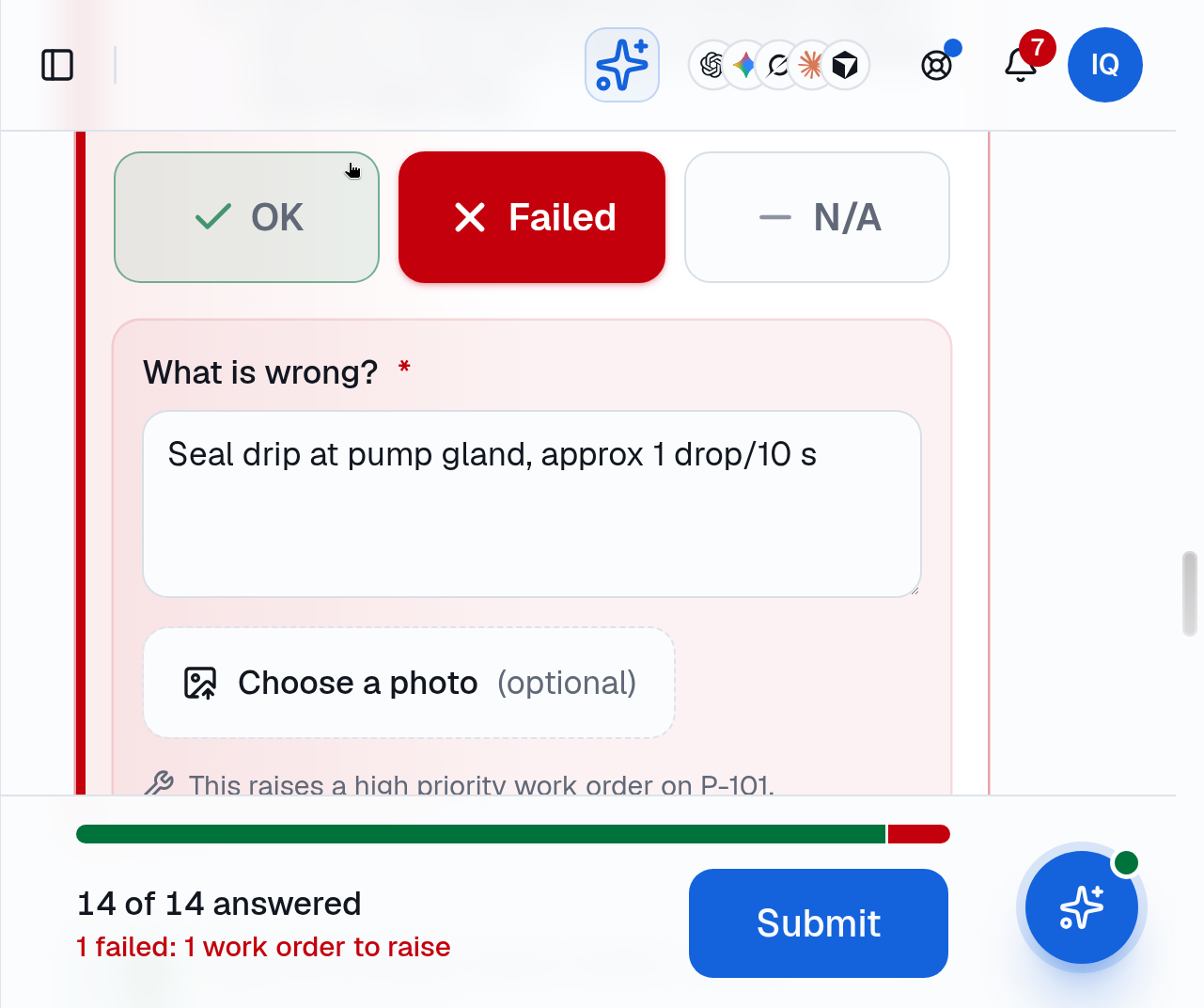
Take one failed item and follow it through both methods. On paper it waits to be read, and in the app it is already a job with a due time.
Paper sheet
Waits for someone to read the sheet
Written later by hand
A missing sheet
Phone round
Raises its own work order at once
Note, photo and limit, due by priority
Shows as Overdue
The tick starts the job
In the app a failed item raises a work order the moment the round is submitted, so there is no gap in which the defect sits on a clipboard.
Point by point
Each method records the round, but they differ in what they do with a failure, with the pass limit and with the history of past rounds.
Where paper still wins
The app is not perfect for every situation, and it is better to know its gaps before you replace a paper process that works.
No signal needed
The app runs in the phone's browser and needs a connection to submit a round. Plan for any area of the plant where there is no signal.
No e-signature
The app has no electronic signature. If your audits need a signed copy, keep one, for example by printing the PDF record of a round and signing it by hand.
Plan for dead zones
Decide in advance how a round is done in an area with no signal, for example by walking to a spot with a connection before you submit.
What paper does well
Paper is cheap, needs no signal and does not run out of battery. A clipboard at the machine is easy to explain to anyone, and for a plant with a handful of machines and a stable team it can work for years. We should not pretend otherwise.
Where paper struggles is after the tick. A completed sheet goes into a folder, and the folder is only read when something has gone wrong. Nobody can sort ten thousand ticks by asset or search a sheet for every seal that has ever dripped.
What a digital checklist changes
A digital round writes its result as data. Every round records the asset, who did it, when, and which items failed, so you can ask the questions paper cannot answer: which assets fail most, which items keep failing, which rounds are late. A failed item does not wait in a folder; it raises a work order with a priority and a due time.
The limits travel with the item. On paper the pass limit lives in a manual or in someone's head, while in the app it is printed under the item, on the record and on the work order, so everyone reads the same number.
Moving over without a big bang
You do not have to switch the whole plant on a Monday. Start with one machine type, such as the pumps, and run the paper sheet and the app side by side for a few weeks. Compare what each shows. Keep paper for machines in places with no phone signal if you have any, and print the PDF record when a signed copy is needed; the printed record has Inspected by, Reviewed by and Date lines, which are lines to sign by hand, not an electronic signature.
What changes on the shop floor
On paper, the inspector writes a tick, takes the sheet back to an office and someone files it. On the phone, the same tick goes into History as soon as the round is submitted, with who did it, when, and any notes and photos. A failed item does not wait for the next time someone reads the sheet; it creates a work order with the item, the note and a due time.
The due time follows the priority: four hours for Urgent, 24 hours for High, 72 hours for Medium and 14 days for Low. On paper, nobody tracks that. In the app, the home screen shows what is overdue and what is due today.
None of this means paper is useless. A paper sheet needs no phone and no signal. The question is what you want to be able to show afterwards, and how fast you need failures to turn into work.
Starting the change
Run one checklist on the phone for a month alongside the paper one, compare what each shows, and then retire the paper. People trust the new method when they have seen it find something.
Frequently asked questions
Is a digital inspection checklist better than paper?
For follow-up, yes. A failed item raises a work order at once, with the note, the pass limit and the asset, and every round is kept with who did it and when. Paper still wins where there is no phone or no signal. The best test is to run both for a month and compare what each one shows.
Where does paper still win?
A paper sheet needs no phone, no signal and no battery, so it still works in a dead spot or an area where phones are not allowed. It is also quick to hand over for a signature. The app runs in the phone's browser and needs a connection to submit, and it has no electronic signature.
Does the app have electronic signatures?
No. The app has no electronic signature. The PDF record of a round has lines to sign by hand, so if your audit or customer needs a signed copy, print the PDF and sign it. The round itself is kept in the app with who did it and when, but that is a record and not a signature.
What records does the app keep?
Every submitted round is kept with its results, who did it, when, and which version of the checklist was used. A failed item keeps its note, an optional photo and the limit, and it becomes a work order. History and the CSV export show rounds over time, and a PDF can be created for any single round.
Does the checklist version stay with the round?
Yes. Editing a checklist creates a new version, and past rounds stay linked to the version they used. That means the record shows what was asked on the day, even if a limit was changed later. On paper, a reprinted sheet can silently replace the old one and nobody can tell which version was used.
Can I trial the app without dropping paper?
Yes, and it is the best way to start. Run one checklist on the phone for a month alongside the paper one, compare what each shows, and then retire the paper. People trust a new method when they have seen it find something. The 14-day free trial is enough to set up one checklist and run a few rounds.
Move your rounds off paper
Run a round on a phone and see the follow-up start with the tick.
- Work order from a failed item
- Overdue rounds visible
- PDF and CSV records
14-day free trial · no card needed