An equipment inspection program does not need a long document. It needs six decisions, made in order: which assets, which checklists, how often and who, how rounds are run, how failures are closed, and how the checklists improve. This page lays those six steps out as they are set up in iFactory Inspection, and says where the app helps and where the decisions are yours. Start your first program in your workspace once your company is set up.
Inspection · Program setup
How to set up an equipment inspection program in six steps
The program runs from the asset list at the start to a review of what the records suggest at the end. Each of the six steps feeds the next, so they are best done in order.

The six steps
Here are the six steps in the order they are done. The app supports each one, but the first four involve decisions that only your own team can make.
- 1 · List the assetsAdd your assets one by one, or import a CSV or Excel file of your equipment list, and print QR labels if you want a way to report faults from the machine.Assets, QR labels.
- 2 · Choose the checklistsStart from a ready checklist, have iFactory AI draft one from a description and your last 90 days of work orders, or write one by hand. Any of the three can be edited afterwards.Check every limit against the maker's manual before the first round, because the ready and drafted limits are general figures.
- 3 · Apply and scheduleApply the checklist to every asset of a type or to chosen assets, then set how often it is done and who does the round.The frequency is one of four choices: every shift, daily, weekly or monthly. The next round is due one frequency after the last.
- 4 · Run roundsRounds are done on a phone in its browser, so the technician takes the checklist to the machine and answers each item at the point of the check.Each item is answered OK, Failed or N/A, and a failed item asks for a note and an optional photo.
- 5 · Close the failuresEvery failed item raises its own work order, and the step is to work each one through to a close, so no defect is left sitting.Findings list.
- 6 · ReviewOnce rounds and work orders build up, see the changes that iFactory AI suggests from your records, and apply or dismiss each one.The app asks for these decisions, and the answers are yours. It keeps the schedule, but it cannot choose what matters to your plant.
Decisions that are yours
The app asks for each of these, but it cannot choose for you. A good answer comes from people who know how the equipment fails.
Which assets
Every asset of a type, or chosen ones
Start with the assets that stop production when they fail, because that is where an inspection pays for itself first.
How often
Every shift, daily, weekly or monthly
Match each check to the way the equipment really fails, using the failure history of the machine and the maker's guidance.
Who does it
Operator or technician
The choice of frequency and the owner of the round are written on the checklist, so they are visible to everyone who uses it.
What passes
The limit in each item
Limits come from your maker's manual, with the ready library values as a starting point only.
Six steps from asset list to review
You decide each one of these, and the app keeps the schedule so that the decisions are not forgotten.
Where the program lives
The overview lists what is overdue, due today and coming up, so the schedule stays visible without a planner rebuilding a spreadsheet.
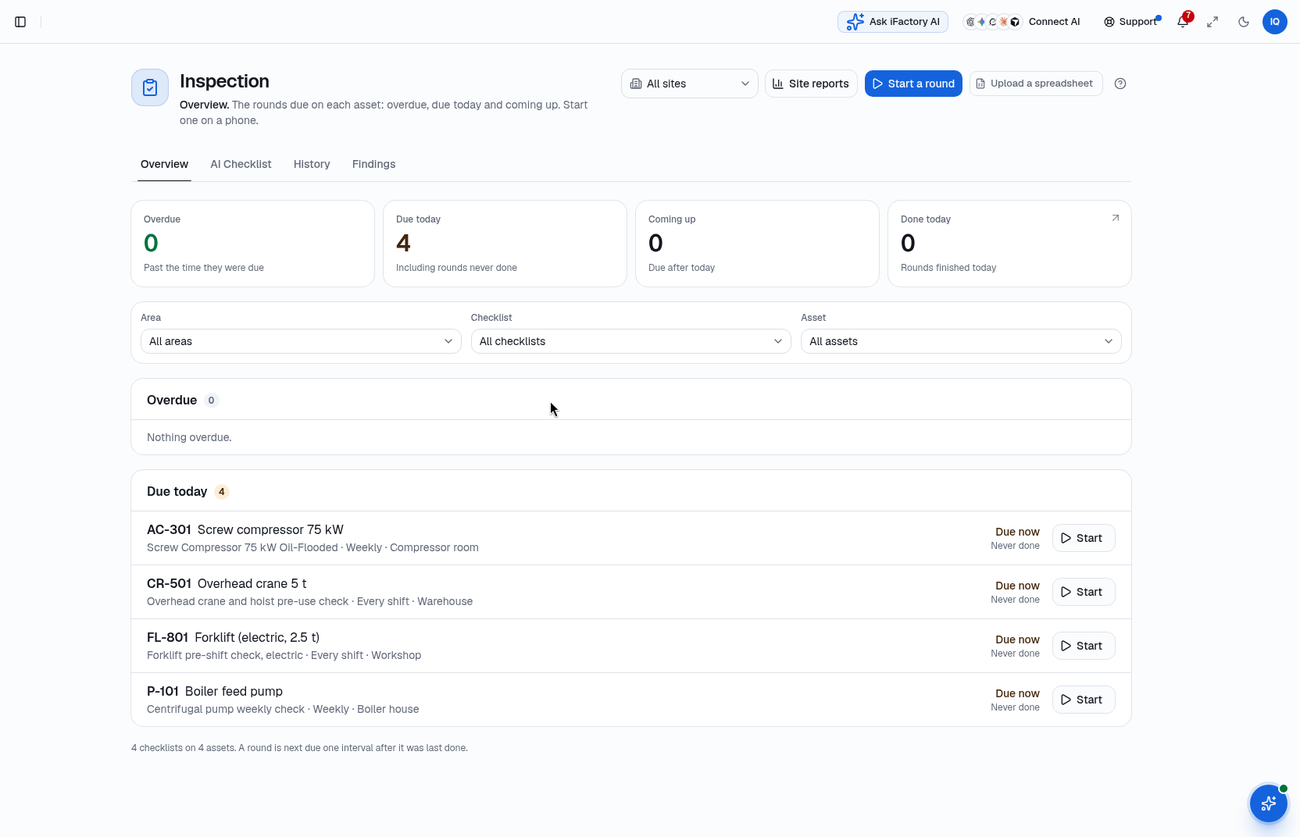
Due today
Rounds due this shift or day.
Coming up
What is next.
Done today
What is finished.
What the program does not do for you
The app supports the routine and does not replace judgement. It is clear about what it leaves to you.
No automatic limits
You check every limit against the maker's manual, because no software knows your machine as well as its manual and your technicians do.
No fixed schedule
Frequency is your choice from four options, and the app will not tell you how often a machine should be inspected.
Not a quality system
The program covers equipment rounds. It does not cover product quality checks, which have their own methods and records.
Who owns what in a program
A program is the set of decisions that make inspections happen consistently: what is covered, how often, who does it, what counts as a pass, and what happens when something fails. In the app each of those decisions has a place. What is covered is the asset list; how often and who are set on each checklist; the pass limits are written into each item; and what happens on a failure is the work order.
Give each piece an owner. The person who knows the equipment decides the items and limits. A supervisor decides who does the rounds. Maintenance owns the findings. Without owners, a program becomes a folder of forms.
Starting small and growing
Begin with the equipment that hurts most when it stops, usually the critical assets. Import the list, mark criticality, and set up checklists for the top few types. Run them for a month, read the history, and see what the failures say.
Once rounds are being done on time and findings are being closed, widen the program to the next group of equipment. Add the ready checklist for each new type or draft one with iFactory AI. A program that grows in steps survives better than one launched across the whole plant in a week.
Measuring whether it works
The site reports show open work orders, overdue items, rounds done, failed items and findings over the last 90 days, with sites compared side by side, and can be emailed every Monday. Use them in a weekly review: are rounds being done, which assets keep failing, are findings being closed.
The reports describe activity, such as rounds done and failures found. They do not rate your safety culture and they do not prove compliance.
Starting small
A program does not have to start with every asset. Pick one area, apply a ready checklist to its critical machines and run it for a month. The overview, history and findings will show you where the gaps are before you extend the program.
Frequently asked questions
What are the steps to set up an equipment inspection program?
Six decisions in order: which assets, which checklists, how often and who, how rounds are run, how failures are closed, and how the checklists improve. In iFactory Inspection that means importing or adding assets, choosing or drafting checklists, setting frequency and owner, running rounds on a phone, working findings to close, and reviewing suggested changes.
Can iFactory AI draft the checklists?
Yes. You describe a machine and what goes wrong with it, and iFactory AI drafts a checklist of 6 to 30 items, optionally using the last 90 days of your work orders. A person reviews every item and limit against the maker's manual and saves it. Nothing is saved on its own, and the draft offers Undo.
How often can rounds run?
Every shift, daily, weekly or monthly, chosen when you save a checklist. The next round is due one frequency after the last one. The app does not tell you how often to inspect, because that depends on the maker's manual, your site rules and the machine's history. The ready checklists come with a sensible starting choice.
What happens to failed items?
Each one raises its own work order, due by the item's priority: Urgent in 4 hours, High in 24 hours, Medium in 72 hours or Low in 14 days. It carries the note, the how-to-check text and the limit, and it is tracked in the Findings tab until someone closes it. Somebody must own the findings, or the list grows.
What is the smallest useful inspection program?
One checklist on one asset that stops production, run weekly by the person who knows the machine. Start from a ready checklist if one fits, check every limit against the manual, and look at the findings after a month. That is enough to show whether the approach works before you add more assets and more checklists.
Does the app prove compliance?
No. The reports describe activity, such as which rounds were done, which items failed and how findings were closed. They do not rate your safety culture or prove that you meet a rule. They give you a dated record to support your own inspection files, and your own procedures decide whether those are enough.
Get your inspection program started
List assets, pick a checklist and let the first rounds appear.
- Ready or AI-drafted checklists
- Rounds on a phone
- Findings worked to a close
14-day free trial · no card needed