
A weekly maintenance checklist is easy to write and hard to keep up. The problem is not the list. It is knowing which assets are due, which are overdue and what happened to the failures. This page brings together the ready weekly checks in iFactory Inspection for plant equipment, shows how a round falls due a week after the last one and explains how the overview keeps the week visible. It is a plant equipment list, not a home or yard one. Set up your weekly rounds in your workspace once your company is set up.
Inspection · Weekly checklist
Weekly maintenance checklist for plant equipment
Five of the ready checks are weekly, and the schedule behind them is the same for all five: a round falls due one week after the last one.

The ready weekly checks
Each of the weekly checks can apply to every asset of a type or only to chosen assets, so a plant can start with its most critical equipment.
The hydraulic power unit check is also on the ready list. Its items are not listed on this page, so look at it in the library before you use it.
The week, kept visible
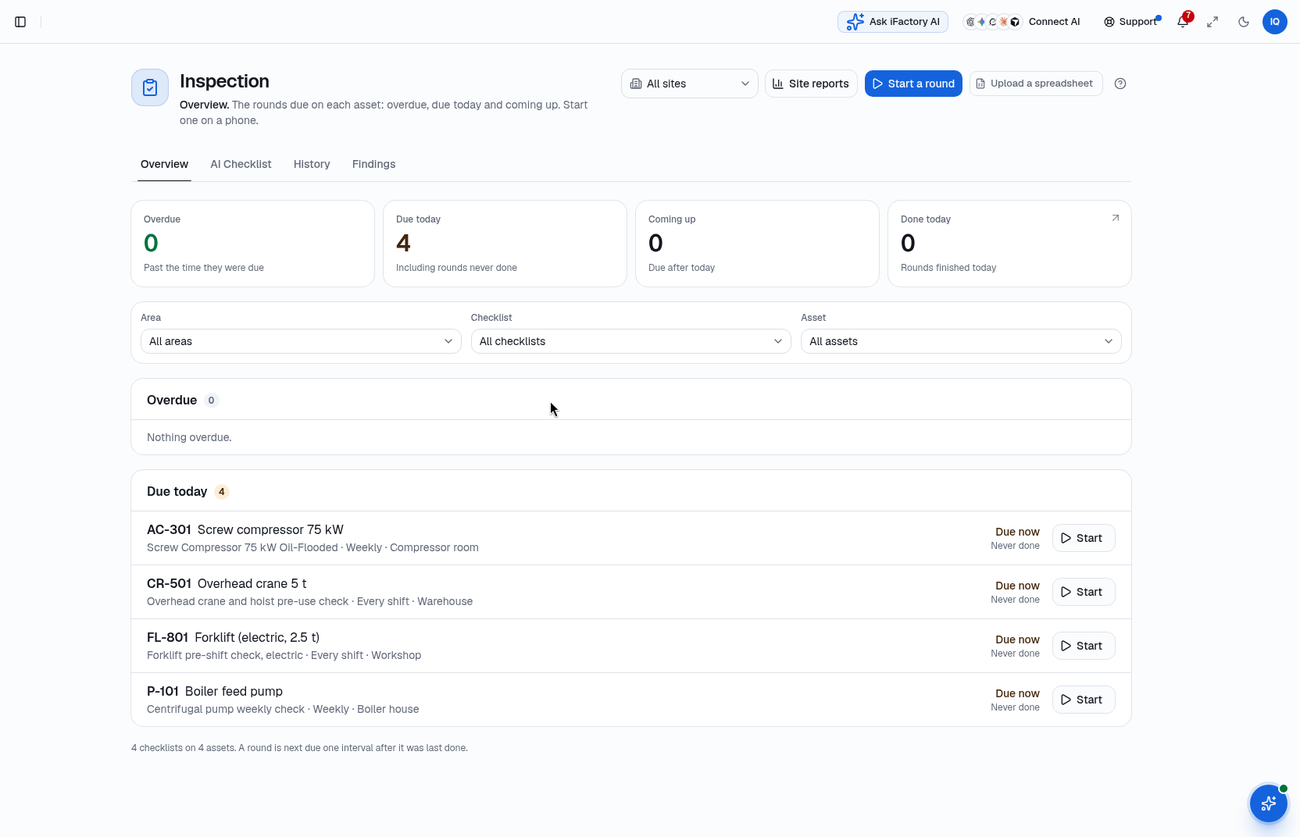
The overview shows what is due, what is overdue and what is coming up, so the week stays visible to everyone.
How the week works
This is how a weekly round moves from the first one to the next, and what the home screen shows at each stage.
- Set it upChoose a ready checklist and apply it to the assets it should cover, then set who does the round.The checklist can cover every asset of a type, such as every pump, or only the chosen assets, optionally at one site.
- First roundA round that has never been done is due now, which is why a new checklist shows straight away on the home screen.A new weekly round shows as due today on the day the checklist is saved, so the first round can be done at once.
- After a roundOnce the round is submitted, the next one is due a week later, counted from the day it was actually done.The weekly frequency is chosen when the checklist is saved and applies to every asset it covers.
- A missed roundA round that is not done by its due time shows under Overdue, which is listed first on the home screen.The overview is the screen that a shift lead checks at the start of the week and at the start of each shift.
- A failed itemEach failed item raises a work order due by its priority: Urgent in 4 hours, High in 24 hours, Medium in 72 hours or Low in 14 days.The failures are followed up in the Findings tab, where each one can be assigned, started, put on hold and closed.
What every item carries
The weekly checks have the same structure, so a technician who has done one knows how the others work.
How to check it
Method and the pass limit
Every item has its how-to-check line and its limit written on it, so the person doing the round does not need a manual.
Priority
Urgent, High, Medium or Low
The priority on each item sets the due time of the work order if it fails.
Lockout flag
Where the machine must be locked out
The lockout flag is ticked on the items that need the machine isolated, as a reminder to follow your own procedure.
The week on one screen
The overview lists what is due today, what is overdue and what is coming up, and it is the nearest thing to a weekly plan that the app needs.
What this list is
The scope of these checklists is plant equipment, and it is worth being clear about what that means.
Plant equipment
These are industrial equipment checks. They are not a home, garden or yard maintenance list.
Edit as needed
Change any item in your own copy of the checklist, so it matches the equipment you actually have on site.
OEM manual first
The limits are general figures. Check every one against the maker's manual before the first round.
Which equipment gets a weekly round
In the ready library the weekly rhythm belongs to the equipment that works hard and wears in a way you can see within a week: centrifugal pumps, rotary screw compressors, gearboxes, cooling towers with a fan and hydraulic power units. Each is a technician round of about 15 minutes, except the cooling tower, which takes about 30.
A weekly checklist is not a maintenance schedule in the sense of a list of tasks. It is an inspection: a person looks, listens and measures against a limit. That makes it quick enough to do every week without becoming a chore.
Building a week that works
Because the next round is due a week after the last one was done, a Monday round that slips to Wednesday moves the next one to the following Wednesday. If you want rounds to land on the same day, make sure they are done on the day. The home screen lists what is overdue first and what is due today next, so the person planning the week can see it.
Choose who does each checklist when you save it, a named person or a role. Rounds then show up for that person. One technician can cover a week's worth of equipment in an afternoon.
Reading the week afterwards
On Friday, open History. Rounds are listed with their results, so you can see which were done, which found something and which are still to do. The Findings tab lists what failed and the status of each work order, so a failure from Tuesday that is still New on Friday is easy to spot.
Export the history to CSV for a weekly meeting, or read the site report for the last 90 days to see rounds done, failed items and open work orders together.
Keeping the week light
A weekly round for four or five assets adds up to an hour or two of a technician's week. That is easy to lose if the list grows. Keep each checklist to the items that matter, and split a long one into a short weekly one and a longer monthly one.
The hydraulic power unit and the gearbox are good examples of assets that benefit from a short weekly list. The cooling tower check, at about 30 minutes, is the longest weekly list in the library, so schedule it with some slack.
If a weekly round keeps being skipped, ask why. It is usually that the list is too long, the time is wrong or nobody has been assigned.
Frequently asked questions
What is on a weekly maintenance checklist for plant equipment?
Five ready weekly checks in iFactory Inspection cover the centrifugal pump, the air compressor, the gearbox, the cooling tower and fan, and the hydraulic power unit. Each applies to every asset of a type or to chosen assets. Every item has a how-to-check line, a pass limit, a priority and, where needed, a lockout flag.
When is the next weekly round due?
One week after the last round was done. A round that has never been done is due now, and shows as due today. If a round is done late, the next one is counted from when it was actually done, not from when it was meant to be done.
How do I see what is overdue?
On the home screen, where overdue rounds are listed first, then those due today and those coming up. Each row shows the asset, the checklist and who is assigned. The app does not send an email or push message for each overdue round, so make the overview part of the start of every week and every shift.
What happens to a failed item on a weekly round?
It raises its own work order, due by the item's priority, with the note, the how-to-check text and the limit attached. It is tracked in the Findings tab until someone closes it. Export the history to CSV for a weekly meeting, or read the site report for the last 90 days to see rounds, failures and open work orders together.
How long does a weekly round take?
The pump, compressor and gearbox checks are written for about 15 minutes each, and the cooling tower check for about 30 minutes. One technician can cover a week's worth of equipment in an afternoon, if rounds are assigned sensibly. If a weekly round keeps being skipped, ask why, because the cause is usually a list that is too long or nobody assigned.
Is it a checklist for a home or yard?
No. These are industrial plant equipment checks, written for technicians with an IR gun, a vibration pen and a clamp meter. They are not for home, garden or yard maintenance. For plant equipment, you can edit any item in your own copy so that it matches the machines you actually have on site.
Set up your weekly rounds
Pick the weekly checks and apply them to your equipment.
- Five ready weekly checks
- Overdue rounds visible
- Work order on failure
14-day free trial · no card needed