Some stops should always reach maintenance without anyone remembering to ask. Line OEE's work orders from downtime rule does that. Switch it on in Setup → Stop reasons and set the length: when an unplanned stop lasts at least that many minutes, 30 by default, a Maintenance work order is raised, once per stop. You can sign up to access Line OEE and set the rule for your lines, with 14 days of Pro features and no card.
iFactory Tools · Production · Stops & downtime
Long unplanned stops raise their own work order
Once per stop, on the machine it names or else the line, and the managers are told.
The rule in Setup
The rule sits under the stop reasons. It is off until a company switches it on, and the length can be set from 1 to 1,440 minutes.

How a stop becomes a work order
The rule fires once per stop. It names the machine the stop was given, or the line when no machine was named.
Which stops qualify
| Category | Example reasons | Can raise a work order? |
|---|---|---|
| Breakdown | Machine breakdown | Yes, past the limit |
| Changeover / setup | Changeover | Yes, past the limit |
| Waiting for material | Waiting for material, No operator | Yes, past the limit |
| Quality hold | Quality check / hold | Yes, past the limit |
| Planned | Planned break, Meeting / training | Never |

Stop chasing maintenance for long stops
The rule raises the work order and tells the managers. Pro features are free for 14 days, no card required.
Shorter problems: the Work order button
Every stop on the Stops page has its own Work order button that anyone can use, whatever the length.
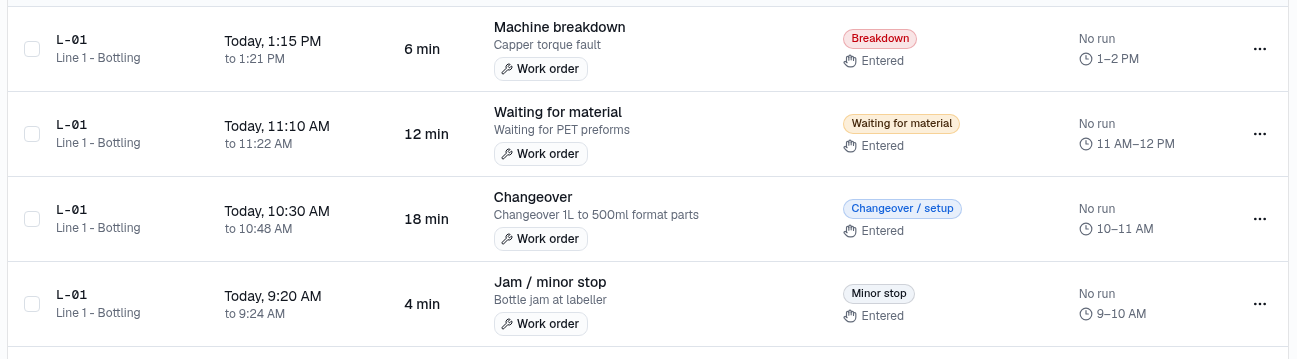
Stop lengths from the test account against the 30-minute default. None reaches it, so the rule would raise nothing; the button covers these. Sample data, not customer results.
Choosing the length
Too short floods maintenance
A low limit turns every changeover that runs long into a work order. Start at the default and adjust.
Too long misses real faults
A high limit lets a repeated breakdown pass without a record. Check Analysis for how long your breakdowns usually last.
Expert review
A close review of the maintenance rule, its tests and the QA journey from Line OEE to Maintenance shows a careful rule: unplanned stops only, once per stop, on the machine or the line, with the managers told.
The rule is a backstop, not a replacement for judgement: the Work order button on each stop still covers shorter faults that matter. Planned stops never raise one. The stops shown are from a test account.
Work order rule questions
When does the rule raise a work order?
When an unplanned stop lasts at least the number of minutes you set, 30 by default. It fires once per stop. You can sign up to access Line OEE and switch it on.
Which machine does the work order go to?
The machine the stop names, or else the line. The managers are told.
Can a planned break raise a work order?
No. Planned stops never raise one, whatever their length.
Is the rule on by default?
No. It is off until a company switches it on in Setup → Stop reasons. The length can be set from 1 to 1,440 minutes.
What about stops shorter than the limit?
Anyone can raise a work order from a stop on the Stops page with its Work order button. The rule complements that button; it does not replace it. You can get started with Line OEE and try both.
Turn on work orders from downtime
Set the minutes once and let long unplanned stops reach maintenance by themselves.
- 30 minutes by default, 1 to 1,440
- Once per stop, machine or line
- Planned stops never raise one
Free for 14 days · no card needed