Line OEE follows the TPM convention for minor stops: they stay inside run time and count against performance, not availability. Two things land there. Gaps between units shorter than the line's stop time never become stop records, but they lengthen the time per unit. Longer stops given the Jam / minor stop reason are recorded in the minor category, which Setup labels as taking performance. Analysis shows both where they belong. You can sign up to access Line OEE and see where your short stops go, with 14 days of Pro features and no card.
iFactory Tools · Production · OEE method
Minor stops lower speed, not uptime
Short gaps and jams stay inside run time, so they cost performance. Here is how Line OEE records and shows them.
Two kinds of short loss, one place
How each stop is treated
| What happened | Recorded as | Takes |
|---|---|---|
| Gap shorter than the line's stop time | No stop record | Performance |
| Jam / minor stop | Stop, minor category | Performance |
| Machine breakdown, changeover | Stop, breakdown or setup | Availability |
| Waiting for material, no operator, quality hold | Stop, material or quality | Availability |
| Planned break, meeting | Stop, planned | Not a loss |

See what short stops cost your line
Map your reasons once and Line OEE puts each loss in the right place. 14 days of Pro features, no card.
A real example from the test account
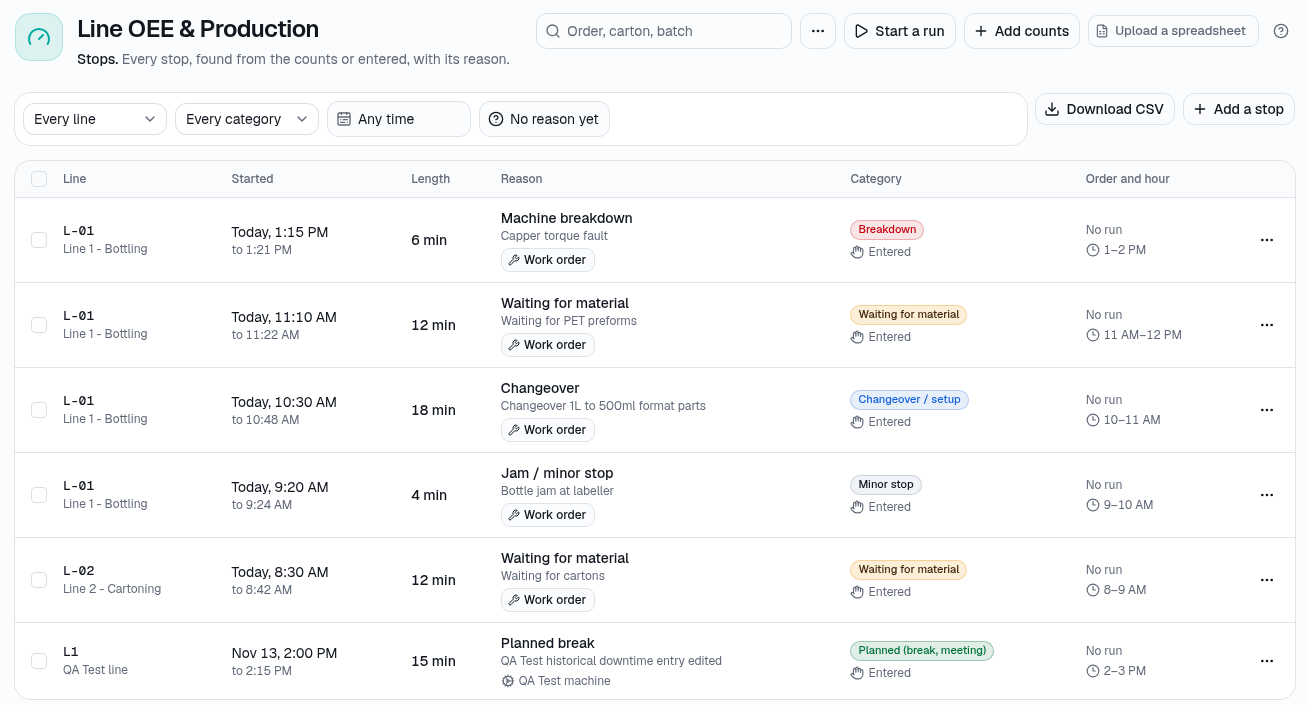
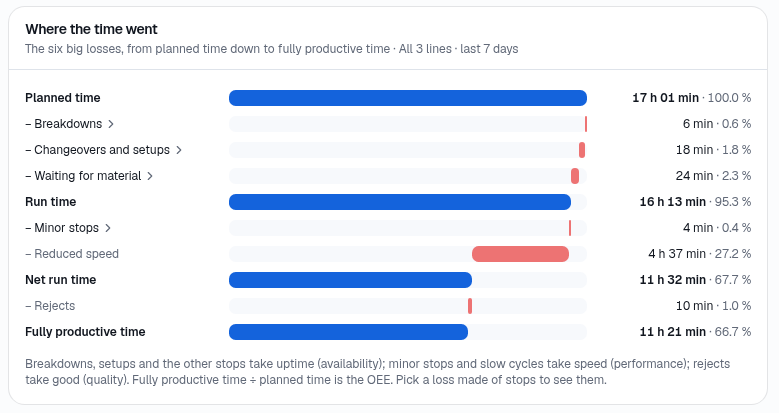
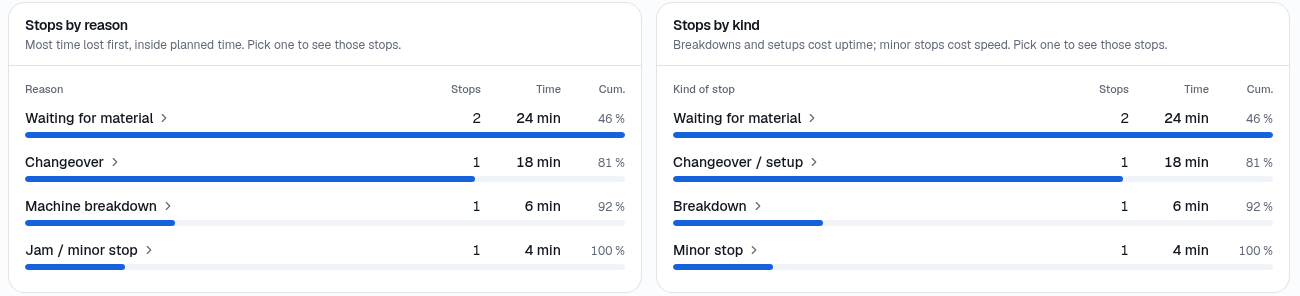
A bottle jam at the labeller was logged as a four-minute Jam / minor stop. In the waterfall, minor stops took 4 minutes, while reduced speed took far more.
Shares of planned time, read from the test-account screenshots. Bars scaled to the larger loss. Sample data, not customer results.
Want more short stops recorded with a reason?
Shorten the stop time
Gaps shorter than the stop time stay hidden inside speed. On a fast line, a shorter stop time in Setup turns more of them into stops that someone can explain.
Expert review
A close review of the OEE code and the portal shows minor stops handled the standard TPM way: kept inside run time and charged to performance, with their own row in Stops by kind and their own bar in the waterfall.
The practical point is the stop time. It decides which short gaps become stops with reasons and which stay inside speed, so set it to suit how fast each line runs.
Frequently asked questions
Why do minor stops lower performance and not availability?
Line OEE follows the TPM convention: minor stops stay inside run time, so the line is counted as running but slower. That time shows as lost speed, not lost uptime.
What counts as a minor stop?
Two things. Gaps between units shorter than the line's stop time, which never become stop records but lengthen the time per unit; and recorded stops given the Jam / minor stop reason, which are in the minor category.
Where do minor stops show in Analysis?
In the Where the time went waterfall, between run time and net run time, and on their own row in Stops by kind. Pick it to see the stops behind it. You can sign up to access Line OEE and see your own.
How do we record more short stops with a reason?
Shorten the line's stop time in Setup. More gaps then become stops that someone can give a reason to, instead of staying hidden in speed.
Can we change which reasons count as minor?
Yes. In Setup → Stop reasons, each reason is mapped to a category, and the page shows whether it takes availability, takes performance or is planned. You can get started with Line OEE with the default list.
Find the short stops on your line
Record a shift and see minor stops and speed loss in their own place.
- Jam / minor stop takes performance
- Own bar in Where the time went
- Stop time you can set
Free for 14 days · no card needed