A dashboard with every number on it still leaves a supervisor to work out what matters. The Needs attention panel on the Line OEE Overview does that work. It lists the lines that need someone's action, each with a short reason and a link to the place to act. You can sign up to access Line OEE and see which of your lines need attention, with 14 days of Pro features and no card.
iFactory Tools · Production · Live views
The lines to look at now, with the reason
Needs attention turns the Overview into a short to-do list, each item linked to where you act.
What it showed in our test account
Two lines were listed, each below target last hour, with the units made against the target and a link to Hour by hour.
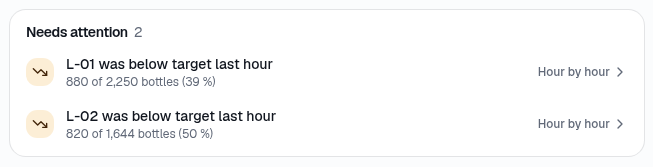
Units made against the hour's target, as shown in the panel. Sample data, not customer results.
Why a list beats a wall of numbers
It names the line
No scanning cards to find the problem. The line code and name come first.
It gives the reason
A short reason, such as below target last hour, with the numbers behind it.
It links to the fix
Each item opens the view where you act, such as Hour by hour.
It uses the same records
Built from the same records as the line cards, so it never disagrees with them.
Know where to walk first
Needs attention lists the lines to check now, with a reason. Pro features are free for 14 days, no card required.
From the list to the hour that slipped

Hour by hour compares each hour of the shift with its target and shows the stopped minutes and top stop reason for that hour.
With the day's summary beside it

Today, all lines
The panel sits beside the day's summary: units, the share of what the lines could make, and stopped time, with links to today's stops and today's analysis.
In the tool, or sent to people
| Needs attention | Alerts | |
|---|---|---|
| Where | Overview panel | Bell in the app and email |
| Who sees it | Anyone looking at the Overview | Managers or everyone, plus listed emails |
| Set up in | Nothing to set up | Setup → Alerts |
| Examples | Below target last hour | Line stopped too long, OEE below target, carton held, ERP failed |
Expert review
A close review of the attention module and its tests shows a small, focused feature: it reads the same records as the line cards, gives one reason per line and links straight to the view where a supervisor can act.
It is a screen, not a pager. Pair it with alerts by bell and email so a stopped line still reaches someone who is not looking. Screenshots are from a test account.
Needs attention questions
What puts a line on the Needs attention list?
The attention logic in the tool checks the same records as the line cards and lists lines that need someone's action, each with a short reason. In our test account, both lines were listed as below target last hour.
Is Needs attention a notification?
No. It is a view inside the tool. For messages that reach people away from the screen, set up alerts by bell and email in Setup → Alerts. You can sign up to access Line OEE and set both.
Where does each item link to?
Each item has its own link. A line below target last hour links to Hour by hour, where each hour is compared with its target.
How is the list tested?
The attention logic is covered by unit tests and by a scripted QA journey in the repository.
Which alerts can I add for people away from the screen?
A line stopped longer than a set number of minutes, shift OEE below target, a carton on hold too long, an ERP posting that failed, and optionally a line running again. You can get started with Line OEE and turn them on.
See which lines need you now
Count a shift and open the Overview: the lines to look at come first.
- A reason for every line listed
- One click to Hour by hour
- Alerts for people away from the screen
Free for 14 days · no card needed