
Depot equipment comes with paperwork: inspection certificates, calibration records and service reports. Fleet Maintenance, the iFactory micro app, stores them against each depot asset with a due date, so the next audit starts with a list and not a search through email. This page shows how equipment certificate tracking works in the app.
Fleet Maintenance · Depot assets · Documents
Equipment certificate tracking with calibration due dates
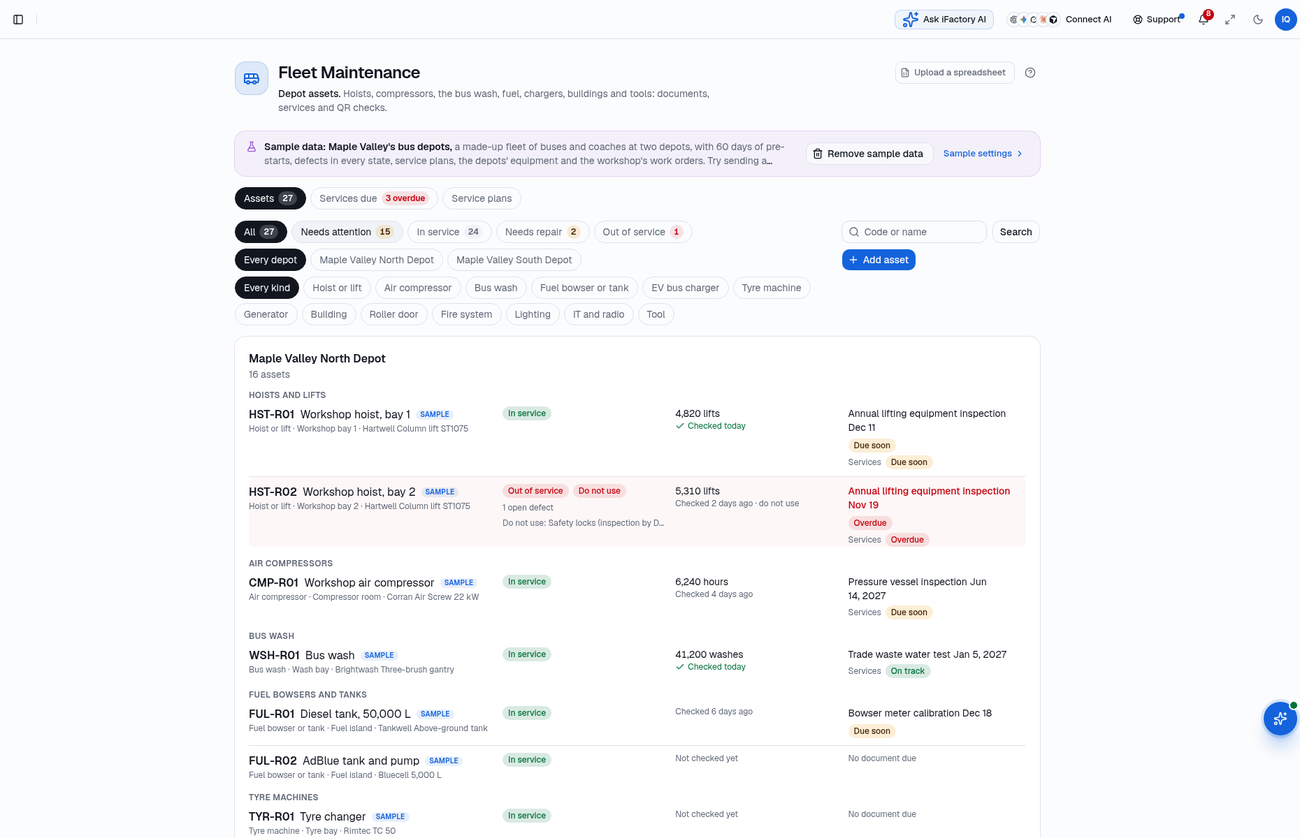
Documents are kept as Inspection, Certificate, Calibration, Service or Other, each with a due date. A document shows Due soon 30 days before it expires, and becomes overdue after the date, counted on the assets page for the person who looks after the depot.

Five document kinds
Each document is stored against an asset and given a kind, so a long list can be read and filtered by what it is.
Inspection
An inspection record, such as the periodic examination of a hoist or a tank, kept with the date it falls due again.
Certificate
A certificate of the asset, for example one issued by a certifying body, stored with its expiry date.
Calibration
A calibration record for equipment that must be checked against a standard, with the next calibration date.
Service
A service report from the workshop or a contractor, kept so the history of the asset is in one place.
Other
Anything that does not fit the first four, so no useful document needs to be left out of the register.
Start the next audit with a list
Every certificate, calibration and inspection sits with its asset and carries a date. Open the sample register to see the due and overdue counts.
Why certificate dates are worth tracking
A lapsed certificate is rarely a surprise to anyone except the person who needed it. A hoist, a fuel tank or a fire system will usually have an inspector who visits on a cycle, and the paper from that visit is easy to file and hard to find a year later. Keeping the document and its due date on the asset means the person who looks after the depot can see, in one list, which items are due soon, which are overdue and which are in order.
The register does not replace the inspector or the certifying body. It shows the dates the depot enters and counts the ones that need attention, which is often all that is needed to book the next visit in good time.
A certificate through its life
The same record moves through four states, from the day it is entered to the day it is renewed.
Add the document
Add it against the asset, with its kind and its due date. The document is then kept with the asset for anyone who opens it.
Due soon
It shows Due soon 30 days before it expires, which gives the depot a month to book the inspector or the calibration.
Overdue
After the date it is overdue, and the assets page counts it so the manager sees what needs attention first.
Replace it
When the new certificate arrives, enter the new date and the cycle starts again, with the earlier record still on file.

What the app does and does not do
The scope is stated plainly so nobody mistakes the register for a certifying body.
Habits for audit-ready records
A few routines keep the register ready when an auditor asks.
Enter dates when you receive the paper
Add the document the day it arrives, so there is never a pile waiting to be typed in before an audit.
Review the overdue count weekly
A short weekly look at the assets page keeps small lapses from becoming findings.
Frequently asked questions
Which document kinds can I store?
You can store Inspection, Certificate, Calibration, Service or Other documents against each asset. Every document has a kind and a due date, so the register can be read by type, and the Other kind catches anything unusual that a depot still wants to keep with the piece of equipment.
When does a document show due soon?
A document shows Due soon 30 days before it expires, which gives the depot a month to arrange the inspector or the calibration. After the date it becomes overdue and is counted on the assets page, and the same items can appear on the dashboard action list for a manager.
Does the app issue certificates?
No. The app tracks the dates you enter and keeps the documents with the asset. It does not issue certificates, carry out calibrations or replace the certifying body, so it should be described as a record-keeping and reminder tool and not as proof of compliance in itself.
Do vehicles have the same dates?
Yes. Registration, inspection and insurance dates work in the same way on vehicles, showing as due soon 30 days ahead and appearing on the dashboard when they are due or overdue. That means one habit of watching due dates covers both the vehicles and the depot equipment.
Where do the assets live?
Assets live in the depot register, with their own QR label, meter, service plans and documents. The depot equipment maintenance page explains the register and its categories, and the Fleet Maintenance tool page lists every feature, so you can follow the examples in the same sample data.
Know which paperwork is due
Documents kept with the equipment, with dates that warn you before they lapse.
- Five document kinds
- Due soon 30 days ahead
- Counts on the assets page
14-day free trial