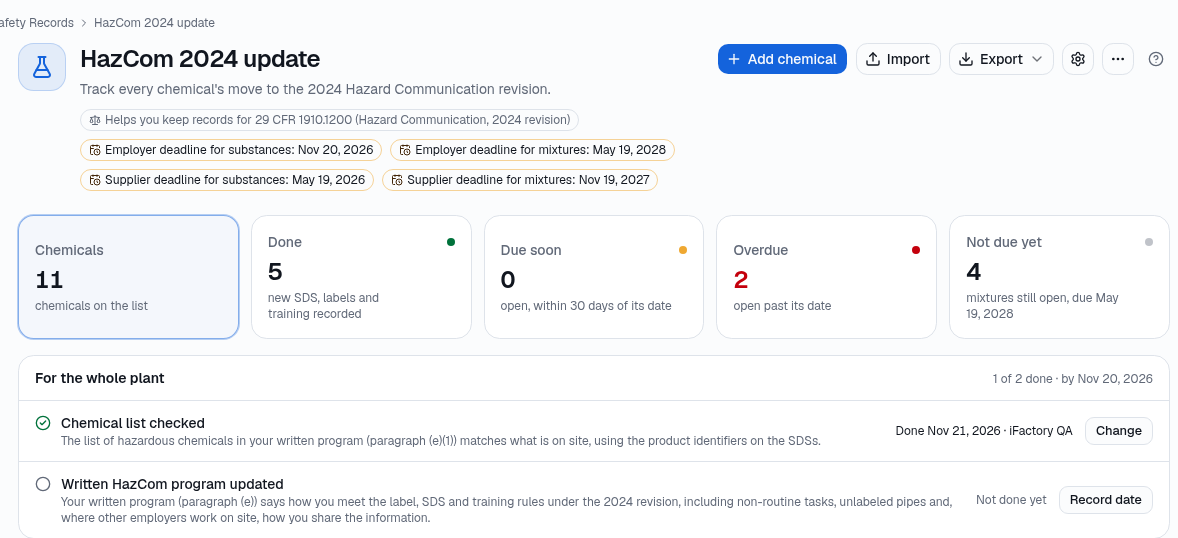
The HazCom dashboard in HazCom 2024 update is a row of status cards at the top of the module, above the plant-wide steps and the chemical table. It answers the question managers ask first: how many chemicals are done, and how many are late? In the iFactory module for 29 CFR 1910.1200 the cards are not a separate report. They count the same records you work in, they change as soon as a step is saved, and each one is also a filter on the table below it. You can see your own status cards as soon as your chemical list is loaded.
Overview · status cards · filters
Chemicals, Done, Due soon, Overdue and Not due yet
Since the substances date of November 20, 2026 passed, the cards show five counts that add up to your total. Click any card to see just those chemicals.

What each card counts
Each card carries a one-line hint under its number, so a new reader knows what it means without asking.
Chemicals
Every chemical on the active list. Hint: chemicals on the list.
Done
New SDS, labels and training all recorded for the chemical.
Due soon
Open, and within the due-soon window of its date. The window is 30 days unless you change it.
Overdue
Open past its date. Today that means any substance with a step still open.
Not due yet
Mixtures still open, due May 19, 2028. Shown so the five cards add up.
Why the cards changed after November 20, 2026
The cards follow the dates. Before anything was close to its date, they read Chemicals, Done, In progress and Not started. Once a chemical is within the due-soon window or past its date, they switch to the due-date set, and the portal adds Not due yet for mixtures.
Statuses are worked out for today on your company's clock and refreshed daily. Warning colours are kept for Due soon and Overdue; Not started uses a neutral tone, since a mixture's date can be many months away.
Get your plant's numbers on one screen
Load your chemicals and the five cards count them for you, every day.
Using the dashboard day to day
Start with Overdue
Click the Overdue card. The table shows only those chemicals, each with "Overdue by" days and its next step.
Work the next step
Open a row, choose Update progress and record the date. The cards update when you save.
Check Due soon
This card shows open chemicals inside your window before their date. It will matter most for mixtures as May 19, 2028 gets closer.
Glance at the plant steps
Under the cards, For the whole plant shows Chemical list checked and Written HazCom program updated, with dates.
Share the numbers
The same counts head the HazCom status report PDF, so a manager gets the dashboard on paper.
The cards, the filters and the plant steps
Below the cards, filter chips repeat the statuses with counts: All, Not started, In progress, Done, Due soon and Overdue. Search narrows the table further.

Cards as filters
Click a card and the table shows that group; click Chemicals to see all again.
Status on every row
Each row's Status matches a card: Done, In progress, Due soon or Overdue, with a short next step.
Plant-wide progress
For the whole plant shows "1 of 2 done" and who recorded each step.

What the dashboard does not show
It counts the module's own records. Some things sit outside it.
Archived chemicals
Archived rows leave the active list and the counts. They stay in the Archived view.
Per-person workload
There is no owner field, so the cards do not split by person. Use Notes if you assign work.
Other modules
The SDS register and Container label audits have their own screens in OSHA Safety Records.
Frequently asked questions
Why are so many substances Overdue?
The employer date for substances was November 20, 2026. Any substance with a step still open is now past its date.
Why do mixtures show Not due yet?
Their employer date is May 19, 2028. Open mixtures are counted there so the cards add up to the total.
Can I change the due-soon window?
Yes. In Settings, set the window in days; 30 is the default.
A product shows Overdue but it is a mixture. Why?
Substance or mixture may be blank, which counts as a substance. Set it to Mixture and the Due by date moves to May 19, 2028. The hazard communication software page covers how dates are set.
How often do the counts change?
Each time a step is saved. Statuses are also refreshed every day on your company's clock, so a chemical moves to Overdue the day after its date.
What does the table look like on a tablet?
On a tablet or small laptop the table shows a Steps done count, such as 2 of 3. On a desktop it shows the New SDS, Labels and Training dates side by side.
See where every chemical stands, at a glance
Five cards, one filter each, updated as your team records the work.
- Done, Due soon, Overdue and Not due yet
- Each card filters the chemical table
- Same counts on the status PDF
14-day free trial · no card needed