A generic checklist asks the same twelve questions of every machine. A better one asks more about the thing that keeps breaking. In iFactory Inspection the AI checklist draft can read your own work orders: leave Use our breakdown history ticked and iFactory AI sees the last 90 days of repairs on the assets you picked before it writes. This page shows what goes into that prompt, what comes out, and what happens when there is no history yet. Draft from your own breakdown history once your company is set up.
Inspection · AI from history
An AI maintenance checklist that reads your breakdown history
Tick one box and the draft is given the last 90 days of work orders on the same assets. A fault that keeps coming back then gets a check of its own, instead of being buried in a generic line.
What goes into the draft, and what comes out
Three things are handed to iFactory AI when the box is ticked and the chosen assets have repair history: your own description, the breakdown history and, where there is one, the matching ready checklist.
Prompt in
The equipment, what is going wrong, who does it, how long it may take
Last 90 days of your company's work orders on the chosen assets, with counts such as Repeated: bearing (2)
The matching ready checklist, where there is one, as a reference
Draft out
A checklist of 6 to 30 items, grouped by section
A specific check is written for the fault that keeps coming back, with how to check it and what passes, instead of a generic line that nobody reads twice.
Check every limit against the OEM manual before using it
Let last quarter's breakdowns shape this quarter's checks
The draft is only a starting point. A person reads every item, edits what needs editing and saves the checklist, and nothing is saved on its own.
Three cases for the breakdown-history box
What the draft has to work from depends on what your account holds. There are three cases, and the app tells you which one applies.
Work orders exist
Ticked, with repairs on the assets
The prompt adds the last 90 days of repairs and any repeated causes, so each of those faults gets an item that is aimed at catching it earlier.
No work orders yet
Ticked, but nothing in 90 days
The panel says that there is no history, and the draft is written from your description and the ready checklist alone. It is still a useful draft, just less specific.
Box left off
Not ticked
The draft ignores your history entirely and works from what you typed. That is useful if you want a clean checklist for a new machine.
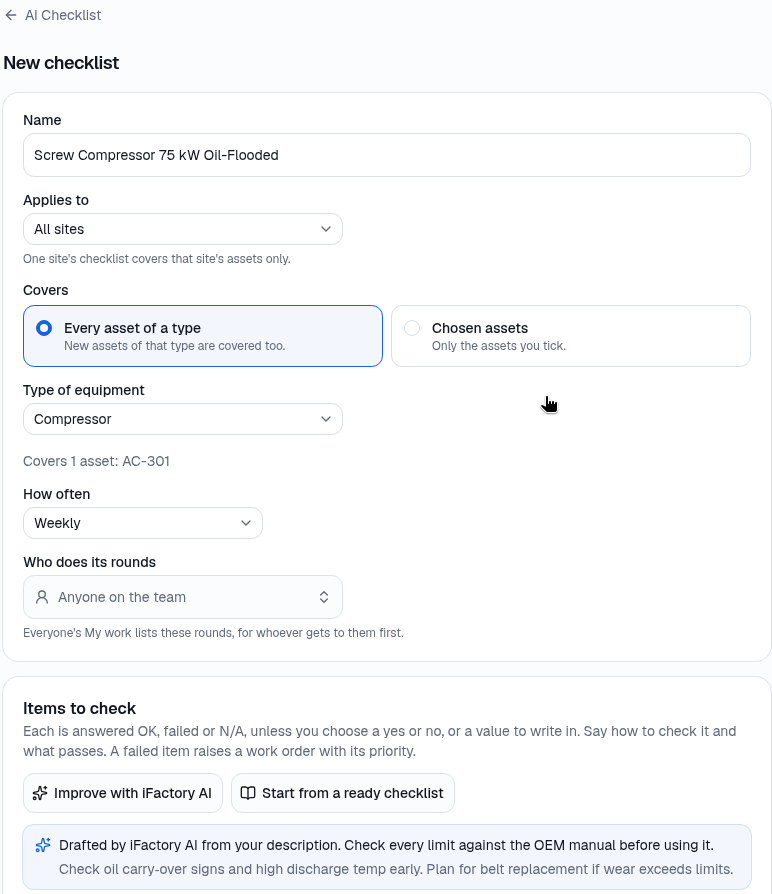
In our QA walkthrough the screw compressor draft had no work orders in the last 90 days, so it was written from the description alone. The test data was entered by iFactory in a QA account.
The draft, before anyone saves it
After drafting, the checklist shows its name, type, what it covers and how often, with a banner that says it was drafted by iFactory AI and to check every limit against the OEM manual. A person edits the items, chooses every asset of a type or chosen assets, sets the frequency and saves.
What the history box does not do
The history informs the draft and nothing more. It does not decide what is safe, and it does not change a checklist you already have.
No history, no repeat checks
With no work orders, nothing repeats, so the draft is only as specific as the description you wrote. A good description of the faults is worth a few extra minutes.
Not a failure predictor
The feature lists what your records show. It does not forecast what will break, and a quiet 90 days does not mean a machine is healthy.
Nothing saves on its own
A person edits and saves the checklist. Until then, the message after drafting offers Undo, and nothing is attached to any asset.
Why the last 90 days
A repair history is a record of what your plant actually does to its equipment. If the same pump has had two bearing repairs this quarter, a generic line saying check the bearing for noise is not enough. With the breakdown-history box ticked, the draft sees the work orders raised on the assets you chose in the last 90 days and the repeated causes counted from them, so it can write a more pointed item.
The window is deliberately recent. Old repairs may reflect a part, a supplier or an operating pattern that has since changed, and 90 days keeps the evidence close to how the equipment runs now.
Writing a prompt that gives the draft something to use
The draft is only as specific as what you tell it. Describe the machine, what keeps going wrong, who will do the round and how long they have. In our test the description named a 75 kW oil-flooded screw compressor that runs two shifts, with faults such as oil carry-over, high discharge temperature trips, belt or coupling wear, a sticking drain valve and a clogging intake filter. The draft came back with 15 items in under 30 seconds.
Read every item before saving. The result carries the reminder to check every limit against the OEM manual, and a person chooses what the checklist covers and how often before it is saved.
Frequently asked questions
What does Use our breakdown history do?
When it is ticked, iFactory AI is given the last 90 days of work orders on the assets you picked before it writes the draft. Repeated causes are counted, for example Repeated: bearing (2), so a fault that keeps coming back gets an item of its own. A person still reviews every item and saves the checklist.
What if we have no work orders yet?
The panel says that there is no history in the last 90 days, and the draft is written from your description and the matching ready checklist alone. It will still have limits and how-to-check lines. It is just less specific to your machine. As work orders build up, you can draft again or improve the checklist.
Is the draft saved automatically?
No. A draft is only a draft until a person saves it, and the message after drafting offers Undo. You read each item, edit, delete or add items and then save. Until you save, nothing is attached to any asset and no round is created. The history box only changes what the draft is written from.
Does the draft still carry limits?
Yes. Each item has a how-to-check line with a pass condition, and a priority that sets the due time of a work order if it fails. Unless you gave your own figures, the limits are general, and the draft reminds you to check every limit against the maker's manual before using it.
How far back does the breakdown history go?
The last 90 days of your company's work orders on the assets you chose. Older repairs are not included, so a fault that happened a year ago will not shape the draft. If you want an older fault covered, mention it in the description of what goes wrong with the machine.
What if two different faults are repeated?
Both are counted and both can get an item. The history is given to iFactory AI with counts such as Repeated: bearing (2), so the draft can aim a check at each repeated cause. The draft still has to fit 6 to 30 items, so the person reviewing it decides which checks are worth keeping.
Draft a checklist from your own breakdowns
Tick the history box and give repeat faults their own checks.
- Last 90 days of work orders
- Repeat causes counted
- Nothing saved until you approve
14-day free trial · no card needed